OCR & TTS
Read text that the game does not let you copy. Listen to your translations instead of reading them. Speak your message instead of typing it.
복사할 수 없는 화면 글자는 OCR로 번역하고, 번역 결과는 TTS로 듣고, 할 말은 타자 대신 목소리로 보냅니다.
OCR, translate visible screen text
OCR, 화면에 보이는 건 전부 번역
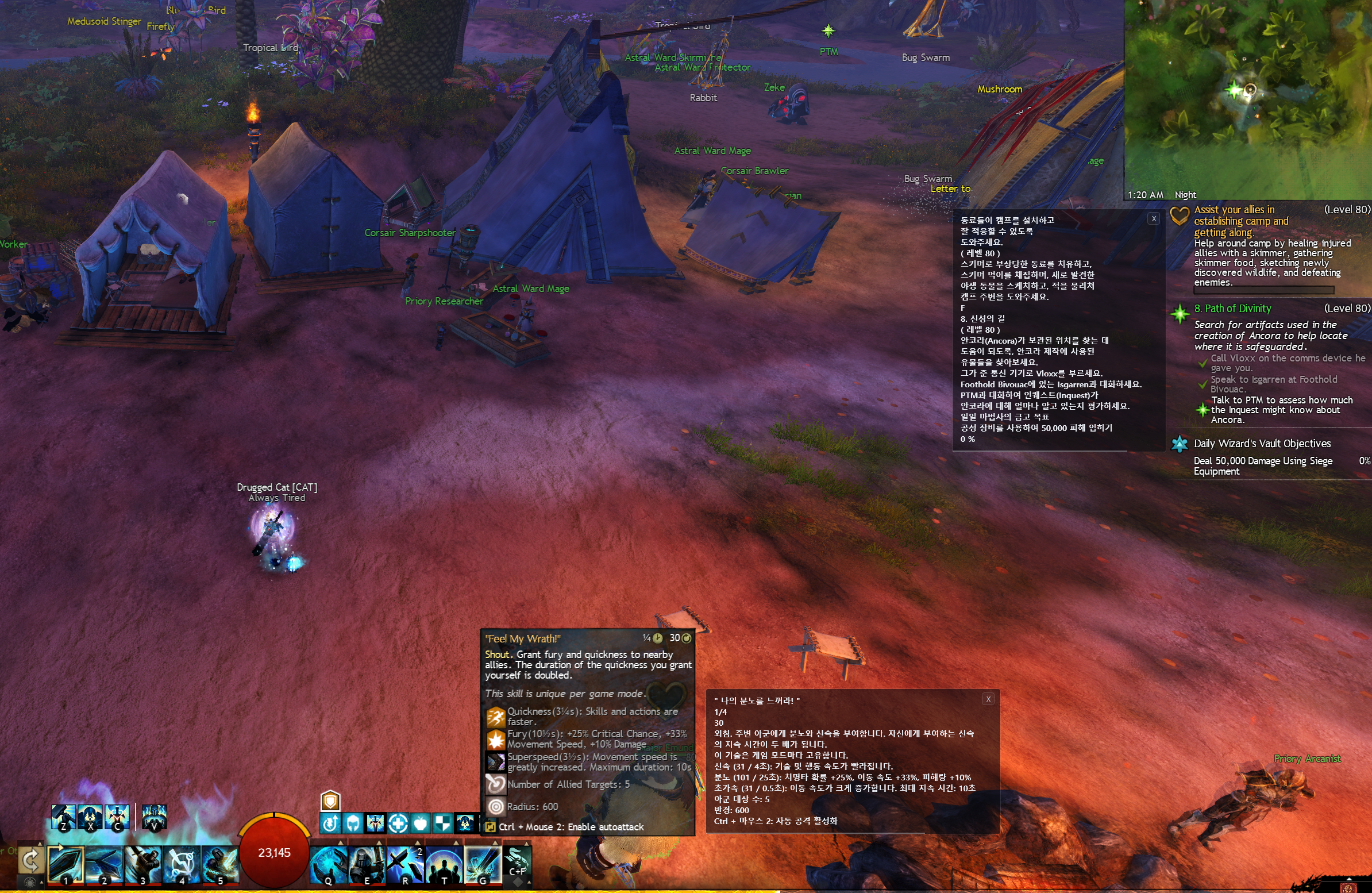
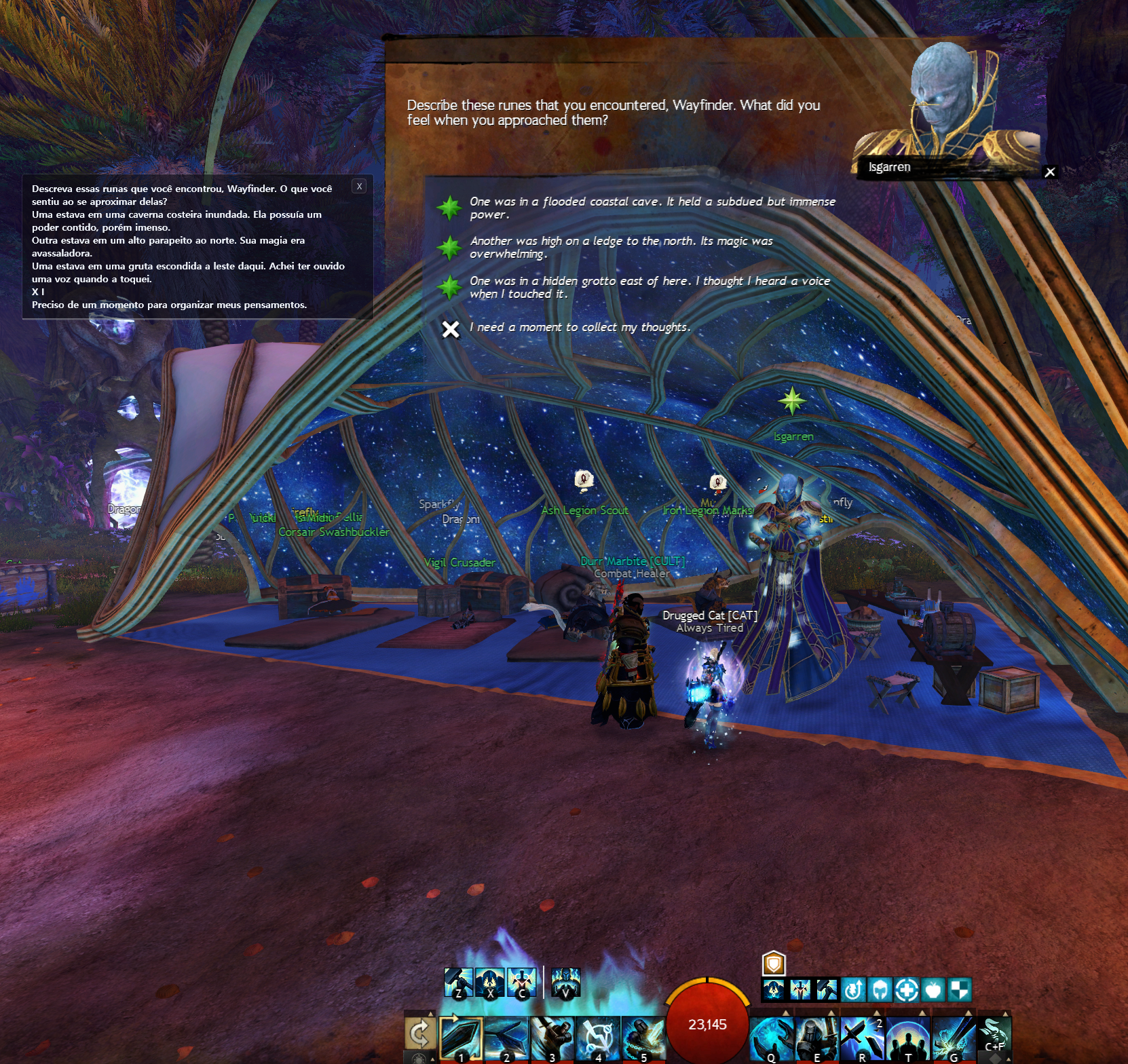
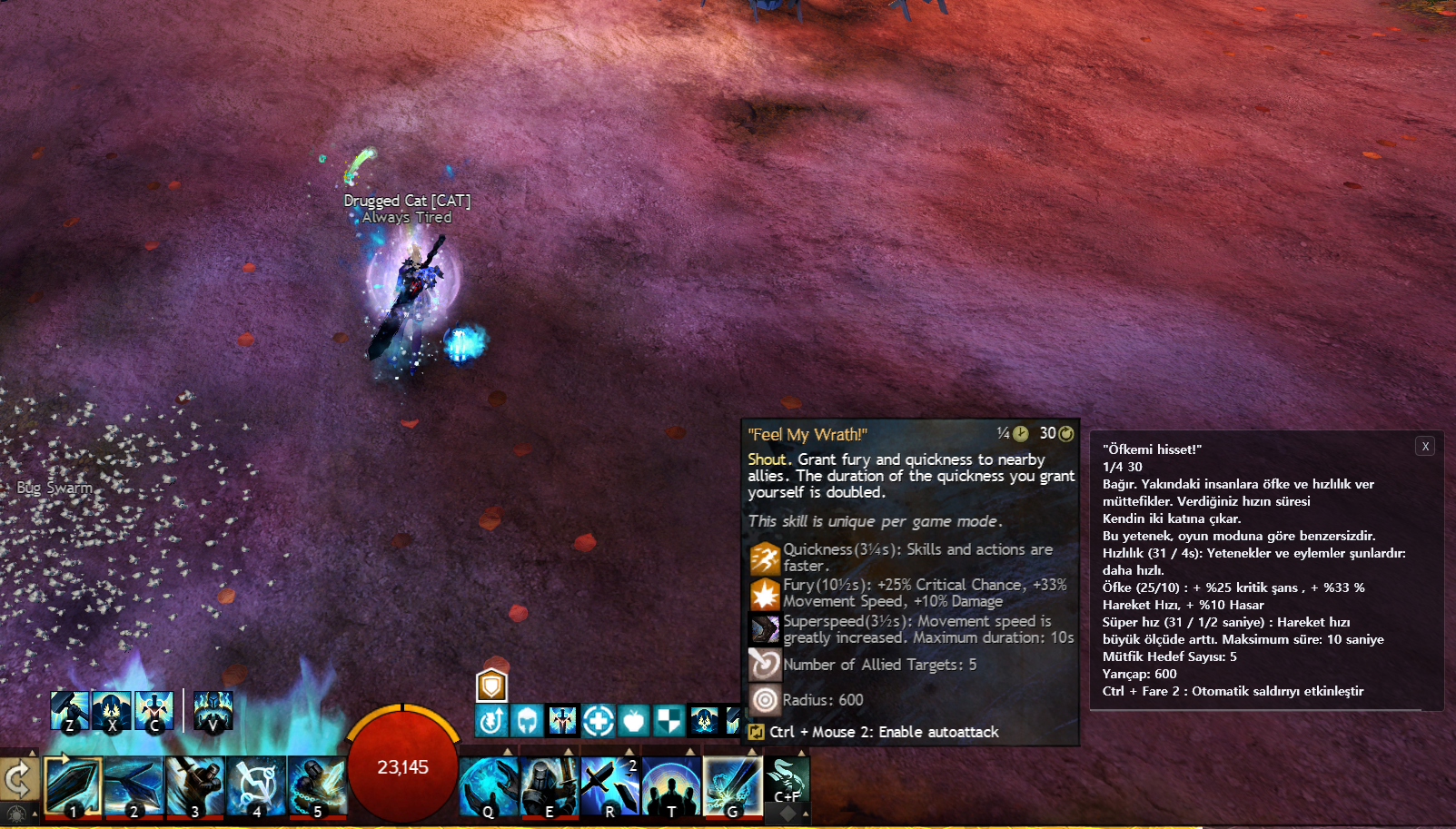
CatBridge already has a proper chat translator that reads real chat data from Guild Wars 2, and this is always more accurate than reading pixels. But a lot of GW2 text lives outside chat. Tooltips that only appear on hover, mail you just received, achievement descriptions, and floating text above an NPC's head. OCR is for screen text the existing translator does not read.
CatBridge에는 이미 길드워2 채팅을 실제 데이터 기반으로 번역하는 제대로 된 번역기가 달려 있습니다. 픽셀을 읽는 OCR보다 당연히 정확하죠. 문제는 길드워2 텍스트 중 상당수가 채팅 바깥에 있다는 것입니다. 마우스를 올려야 뜨는 툴팁, 방금 받은 메일, 업적 설명, NPC 머리 위 뜨는 지문 같은 것들. OCR은 기존 번역기가 읽지 못하는 화면 글자를 번역합니다.
Recognition is fast and strong enough for everyday play. Drag the area, read the result, and keep going without leaving the game.
OCR은 빠르고 인식률도 좋아서 평소 플레이 중에 바로 쓰기 좋습니다. 영역을 드래그하고, 결과를 확인하고, 게임을 계속하면 됩니다.
What OCR covers
OCR이 읽을 수 있는 것
- Skill & trait tooltips. The descriptions that only show on hover.
- Event & achievement text. Objectives and reward descriptions.
- In-game mail. Guild notices, trade alerts, event announcements.
- Whisper / say / map / guild chat. Chat channels the built-in translator does not cover.
- NPC overlay dialogue. Lines that float above heads instead of going into the chat log.
- Most visible in-game text. Drag a box, get a translation.
- 스킬·특성 툴팁. 커서를 올려야 뜨는 설명창.
- 이벤트·업적 설명. 목표와 보상 문구.
- 인게임 메일. 길드 공지, 거래 알림, 이벤트 안내.
- 귓속말·일반·맵·길드 채팅. 기존 번역기가 커버하지 않는 채널들.
- NPC 머리 위 지문. 채팅창에 찍히지 않고 허공에 떠오르는 대사.
- 화면에 보이는 모든 텍스트. 영역을 그리면 그 안을 번역합니다.
Three ways to use it
세 가지 사용 방식
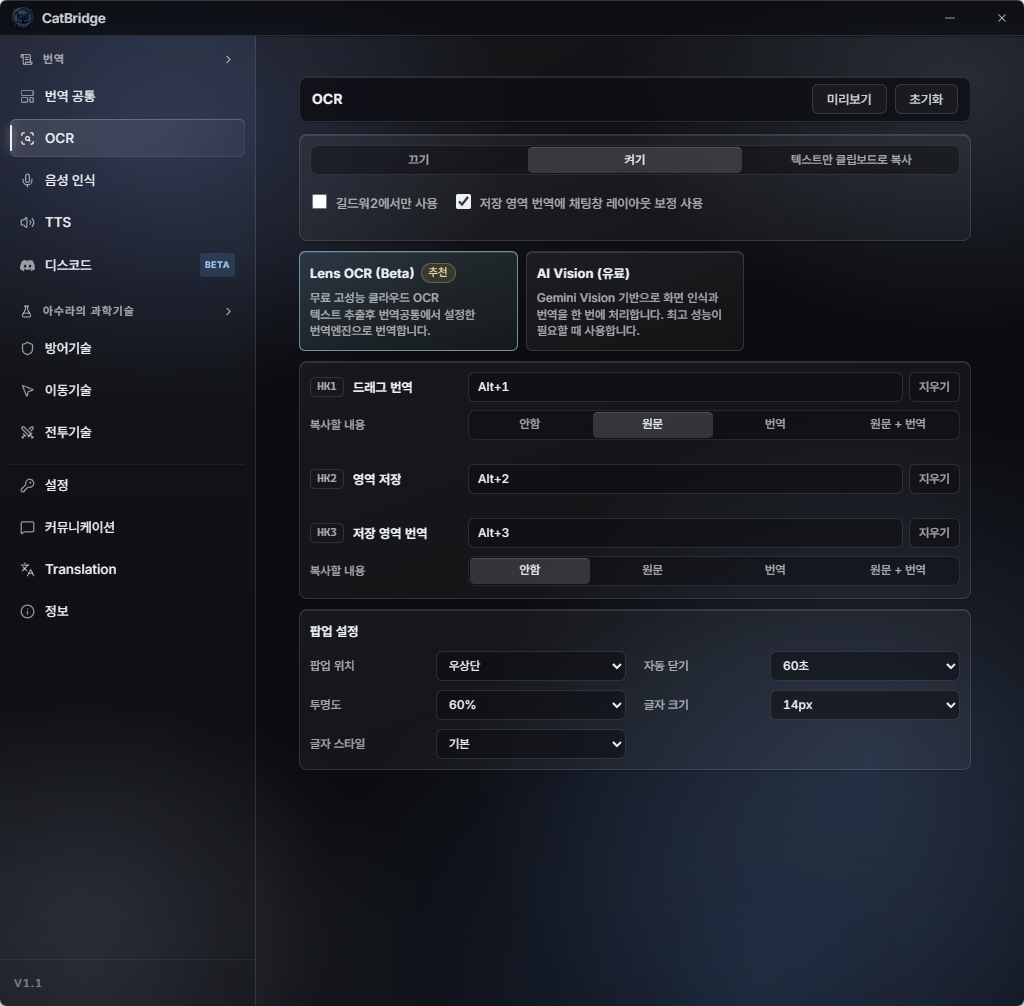
- Drag & translate. Draw a rectangle once, get a translation. Nothing saved.
- Save a region. Mark a spot you'll keep re-translating, like the chat window or a fixed UI panel.
- Re-translate saved region. No dragging. One hotkey and it re-reads the spot you saved.
- 드래그 번역. 사각형을 한 번 그려 그 영역을 번역합니다. 저장되지 않음.
- 영역 저장. 채팅창이나 고정 UI처럼 계속 다시 볼 위치를 지정해 둡니다.
- 저장 영역 재번역. 드래그 없이 단축키 하나로 저장한 위치를 다시 읽습니다.
All three are tied to hotkeys you pick yourself. Use whatever feels comfortable.
세 동작 모두 단축키를 원하는 조합으로 직접 지정합니다. 편한 키로 바꿔서 쓰세요.
Copy text that the game does not let you copy
게임이 막아둔 텍스트를 복사하기
GW2 does not allow direct copying from its chat window. You cannot copy an item link, a sender's name, or a line someone typed. OCR has a clipboard mode that sidesteps this entirely. Drag over the text, and the original, the translation, or both go straight to your clipboard. Paste it anywhere: browser, Discord, notes, even straight back into the game's chat box.
길드워2는 채팅창에서 복사 자체를 차단합니다. 아이템 링크, 발신자 이름, 누가 친 한 줄. 전부 복사가 안 됩니다. OCR의 클립보드 모드는 이 제약을 그대로 우회합니다. 영역을 드래그하면 원문·번역·둘 다 중 원하는 형태로 클립보드에 바로 들어갑니다. 브라우저, 디스코드, 메모장은 물론 게임 채팅창에까지 바로 붙여넣기 가능합니다.
OCR reads the screen as a picture. Game backgrounds, flashing effects, and see-through windows that overlap text all add noise, so recognition will not be perfect. When accuracy really matters in chat, the built-in chat translator is the right tool. Use OCR for screen text that translator does not read.
OCR은 화면을 사진처럼 읽는 방식입니다. 게임 배경, 번쩍이는 이펙트, 글자 위에 겹쳐 뜨는 반투명 창들 때문에 인식률이 떨어질 수 있습니다. 채팅을 정확하게 읽어야 할 때는 기존 채팅 번역기가 정답입니다. OCR은 기존 번역기가 읽지 못하는 화면 글자를 확인할 때 쓰세요.
TTS, listen instead of reading
TTS, 읽지 말고 듣기
For players who prefer listening, the story stays accessible.
글자를 계속 읽기 힘들어도, 스토리는 들을 수 있습니다.
Long story dialogue, dense event text, walls of translated chat. Reading a translation every few seconds while trying to actually play is exhausting. TTS speaks it for you. Keep your eyes on the fight.
긴 스토리 대사, 빽빽한 이벤트 문구, 벽처럼 쌓이는 번역. 전투하면서 몇 초마다 번역을 눈으로 따라가는 건 피곤합니다. TTS가 대신 읽어줍니다. 눈은 전투에 두세요.
Pick what to listen to
들을 대상 선택
- Story. NPC dialogue and cutscene lines.
- Chat. The translated output from the chat translator.
- OCR. Whatever you just scanned with OCR.
- 스토리. NPC 대사와 시네마틱 대사.
- 채팅. 채팅 번역기가 뽑아낸 번역 결과.
- OCR. 방금 OCR로 읽어낸 텍스트.
One channel at a time. Switch whenever you want.
한 번에 하나씩만. 필요할 때 자유롭게 전환합니다.
Free voices, auto-matched to the language
언어 자동 매칭 음성, 전부 무료
The voice synthesis itself is free. No API key, no billing. Choose from multiple voices, and the voice auto-switches to match the translated language. Korean translation gets a Korean voice, English gets an English voice. Speed, volume, and pitch are adjustable.
음성 합성 자체는 무료입니다. API 키도, 결제도 필요 없습니다. 여러 음성을 고를 수 있고 번역된 언어에 자동으로 맞춰 바뀝니다. 한국어로 번역되면 한국어 음성, 영어면 영어 음성으로 읽습니다. 속도, 볼륨, 피치도 조절할 수 있습니다.
Hotkeys you set yourself
직접 지정하는 단축키
- Skip current line. Jump past the line being read right now.
- Play / Stop. Turn the voice off and on again without opening settings.
- 현재 줄 건너뛰기. 지금 읽고 있는 문장을 스킵.
- 재생/정지. 설정창을 열지 않고도 음성을 바로 껐다 켤 수 있습니다.
Both hotkeys are yours to choose.
두 단축키 모두 원하는 키로 직접 설정합니다.
- Chat. Stay locked on the fight. Your squad's chatter arrives in your ear while you focus on mechanics.
- OCR. Point at anything, hear it. Drag the text, it reads out loud. Great for mail, event boards, NPC overlays.
- 채팅. 시선은 전투에만. 스쿼드 대화는 귀로 들어오고, 눈은 메커닉에만 둘 수 있습니다.
- OCR. 가리키면 읽어줍니다. 텍스트를 드래그하면 바로 음성으로. 메일, 이벤트 안내, NPC 지문에 좋습니다.
Voice to Chat: speak instead of typing
음성 인식, 치지 말고 말하기
For players who prefer speaking, chat stays accessible.
타이핑이 번거로울 때는 말로 채팅할 수 있습니다.
TTS is the game's text in your ear. Voice to Chat goes the other way. A message you'd have to stop and type becomes a message you just say — translated into another language, or sent in your own. Hold a key, speak, release. Your words appear in chat. There is no chat box to open, no phrase to search for in a language you rarely write, and no typing at all.
TTS가 게임 글자를 귀로 듣는 쪽이라면, 음성 인식은 그 반대입니다. 원래라면 멈춰서 타자로 쳐야 할 말을, 그냥 말해서 보냅니다. 번역해서 보낼 수도 있고, 내 언어 그대로 보낼 수도 있습니다. 키 누르고, 말하고, 떼면 채팅창에 문장이 찍힙니다. 채팅창을 열 일도, 잘 안 쓰는 언어로 표현을 찾을 일도, 타자를 칠 일도 없습니다.
Two push-to-talk modes: translate, or send your words as-is
두 가지 PTT(눌러 말하기): 번역해서 보내기, 말한 그대로 보내기
- Translate push-to-talk. Speak in your own language, and the translated version appears in chat. Use this when you talk to players who use another language.
- Native push-to-talk. Speak, and the same words appear in chat without changes. This is voice input instead of typing, with no translation.
- Cancel tap. A dedicated key to throw away what you just said if it came out wrong.
- 번역 PTT. 내 언어로 말하면 번역된 문장이 채팅에 들어갑니다. 다른 언어를 쓰는 사람에게 말할 때 사용합니다.
- 원본 PTT. 말한 내용이 그대로 채팅에 찍힙니다. 번역 없이, 타자 대신 목소리로 입력하고 싶을 때 사용합니다.
- 취소 (탭). 방금 인식된 게 이상하면 단축키 한 번으로 취소합니다.
Both push-to-talk modes send to whichever channel your chat box has open at the moment — party, whisper, say, map, guild, all of them work.
어느 쪽이든 지금 채팅창에 선택돼 있는 채널로 나갑니다. 파티, 귓속말, 일반, 맵, 길드 어디든.
Send immediately, or confirm first
바로 보내기, 아니면 한 번 확인하기
Each push-to-talk mode has its own send behavior. Send immediately sends the line into chat the moment you release the key. Tap again to send shows you the recognized (or translated) text first, so you can cancel if the recognition drifted or you changed your mind partway through. As soon as recognition finishes, CatBridge also copies the text to your clipboard. If you want to revise it manually, cancel, paste the text into chat, edit the sentence, then send it yourself.
두 PTT 각각 전송 방식을 따로 고를 수 있습니다. 즉시 전송은 키를 떼는 순간 바로 채팅에 찍힙니다. 다시 눌러 전송은 인식된 문장 (또는 번역문)을 먼저 보여주기 때문에, 인식이 삐끗했거나 말하다 마음이 바뀌었으면 취소할 수 있습니다. 음성 인식이 끝나는 순간 문장은 클립보드에도 복사됩니다. 직접 문장을 고치고 싶다면 취소한 뒤 채팅창에 붙여넣고, 문장을 수정해서 보내면 됩니다.
Voice to Chat uses speech recognition before it sends text to chat, so the Groq API key is the first one to create. Groq gives you a free daily allowance and is also useful for Discord voice translation. Recognition is very fast, so the delay is usually minimal. If you use Translate push-to-talk, CatBridge then sends the recognized text through your selected translation engine such as M, OpenRouter, or Gemini. It is not real-time voice chat; it is speak-to-message.
Voice to Chat은 먼저 음성인식이 필요하므로 Groq API 키를 가장 먼저 발급해두는 것을 추천합니다. Groq는 무료 일일 한도가 있고 디스코드 음성 통역에도 쓰입니다. 인식 속도가 매우 빨라서 딜레이는 거의 없는 편입니다. 번역 PTT를 쓰면 인식된 문장을 M엔진, OpenRouter, Gemini 같은 선택한 번역 엔진으로 다시 번역합니다. 실시간 보이스챗이 아니라 '말해서 메시지 보내기'에 가깝습니다.