Two-Way Chat Translation
양방향 채팅 번역
Understand Guild Wars 2 chat in your language and reply naturally. CatBridge handles both directions in real time.
길드워2 채팅을 내 언어로 읽고 자연스럽게 답하세요. CatBridge가 양쪽을 실시간으로 처리합니다.
The problem
문제
Most GW2 content puts you in groups with players who speak a different language. Dungeons, raids, PvP, WvW — the chat is almost always in a language you may not be fluent in. You may not even know what people are saying. You cannot ask questions, and you have to guess what the group expects.
외국인과 파티나 스쿼드에 들어가면 채팅이 영어로 쏟아집니다. 던전, 레이드 인카운터, PvP, WvW — 어디든 마찬가지입니다. 뭐라고 하는지도 모르고, 질문도 못 하고, 그냥 눈치만 보게 됩니다.
How it works
작동 방식
CatBridge's chat translation has two halves:
CatBridge 채팅 번역은 두 방향으로 작동합니다:
- Incoming: GW2 chat messages are instantly translated and shown in the CatBridge overlay.
- Outgoing: Type in your language in the overlay input box. CatBridge translates it and sends it instantly, or copies it first if you choose clipboard mode.
- 들어오는 채팅: 길드워2 채팅이 CatBridge 오버레이에 즉시 한국어로 번역되어 표시됩니다.
- 보내는 채팅: 오버레이 입력창에 한국어로 입력하면 CatBridge가 원하는 언어로 번역해서 바로 보냅니다. 클립보드 복사는 선택입니다.
You read everything in your language. You write in your language. The other side sees your message in their language. That is the core loop.
나는 한국어로 읽고, 한국어로 쓴다. 상대방은 자기 언어로 내 말을 봅니다. 그게 핵심입니다.
GW2 chat, every language
길드워2 채팅을 모든 언어로
The screenshots below are examples showing chat written in several languages automatically translated into the language selected by the player.
아래 스크린샷은 여러가지 언어의 채팅이 설정한 언어로 자동 번역되어 나오는 걸 보여주는 예시 스크린샷입니다.
The images below are examples. CatBridge supports dozens of languages through free translation engines and optional AI engines, including English, French, German, Spanish, Russian, Arabic, and Thai.
위는 예시입니다. CatBridge는 무료 번역 엔진과 선택형 AI 엔진을 통해 영어, 프랑스어, 독일어, 스페인어, 러시아어, 아랍어, 태국어를 포함한 수십 개 언어를 지원합니다.
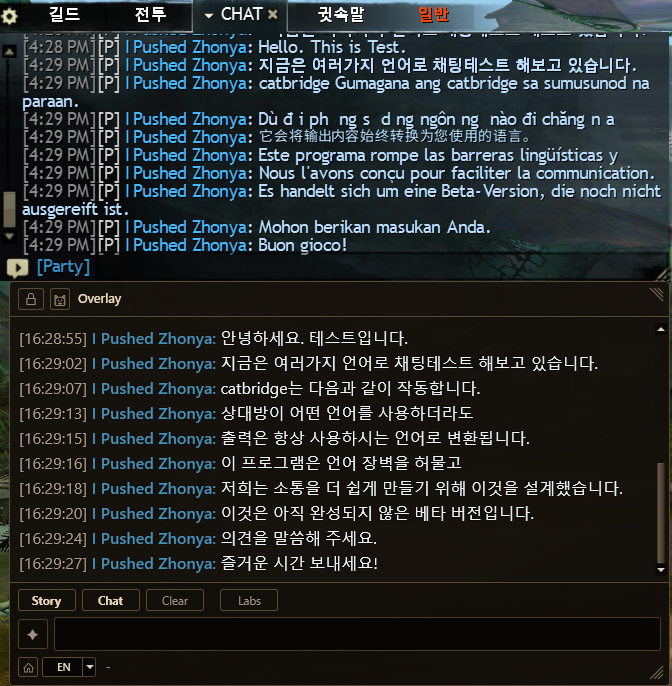
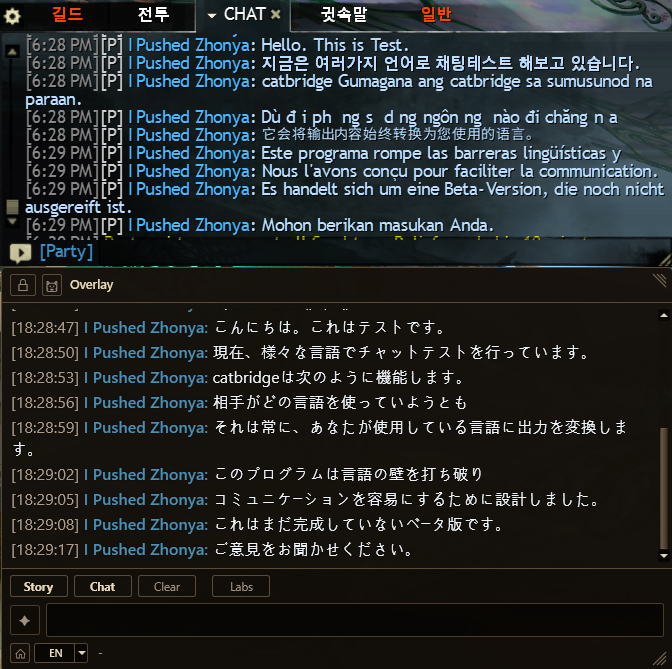
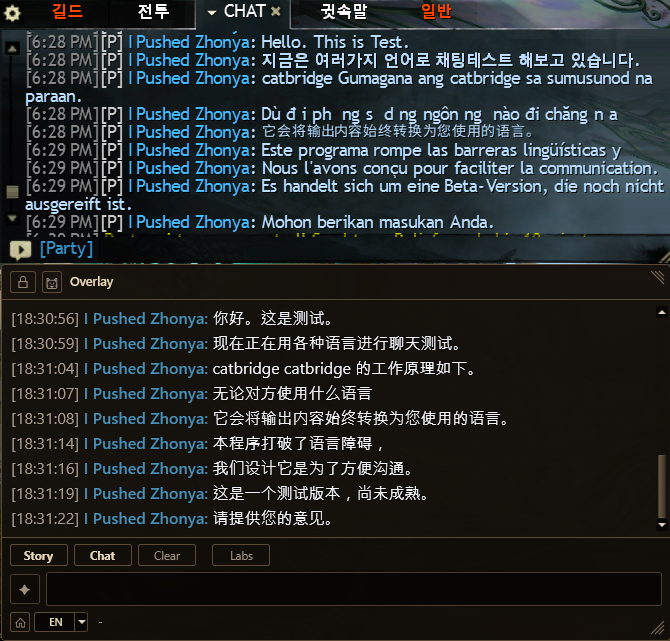
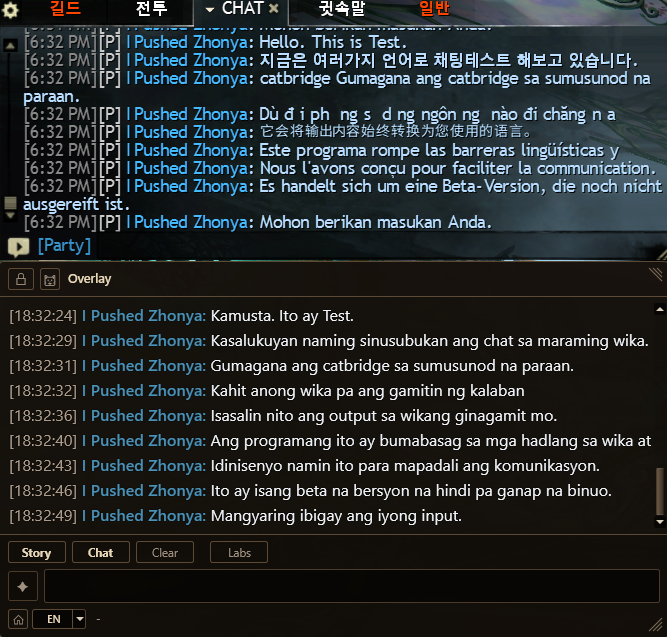
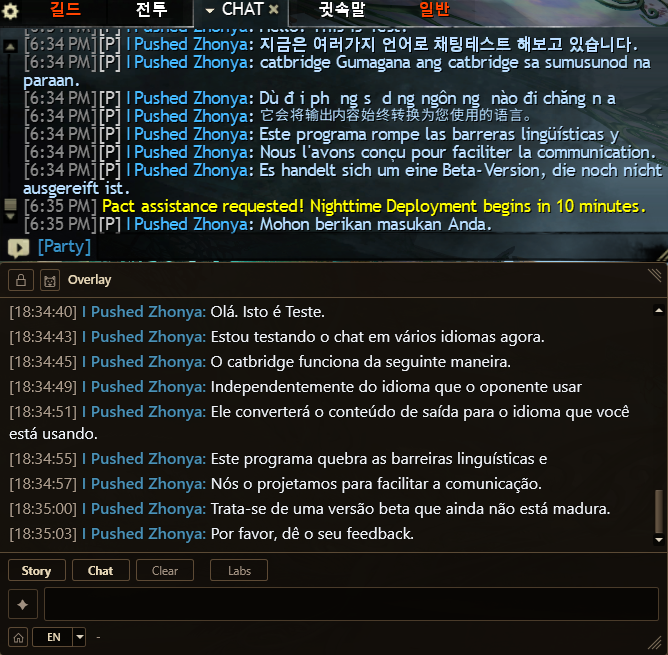
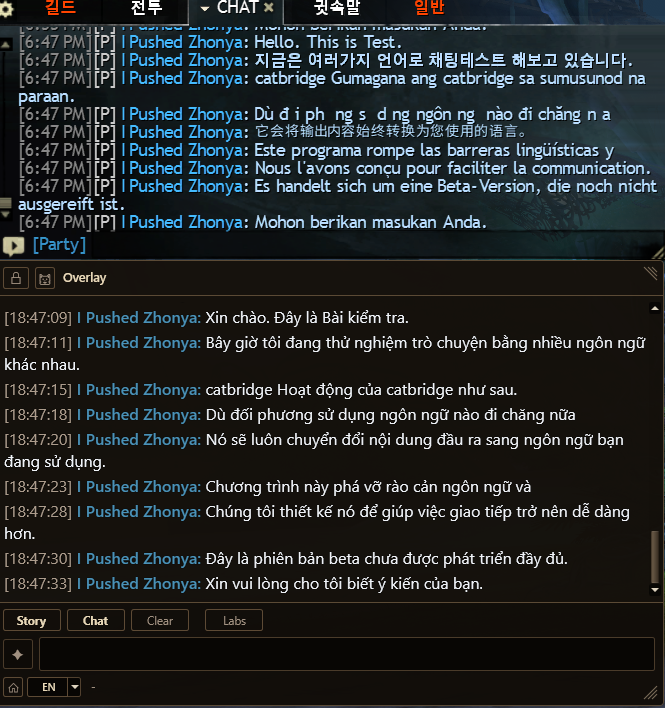
CatBridge is not limited to the languages shown above. It works across the languages supported by your selected free or AI translation engine — dozens of them, including English, French, German, Spanish, Italian, Russian, Turkish, Polish, Portuguese, Indonesian, Thai, Arabic, and many more. Pick whatever language feels natural and CatBridge handles it.
CatBridge는 위 예시 언어에만 묶이지 않습니다. 선택한 무료 또는 AI 번역 엔진이 지원하는 언어 중에서 사용자가 선택한 언어로 표시합니다. 영어, 프랑스어, 독일어, 스페인어, 이탈리아어, 러시아어, 터키어, 폴란드어, 포르투갈어, 인도네시아어, 태국어, 아랍어를 포함해 수십 개 언어가 이미 지원됩니다. 편한 언어 아무거나 고르면 CatBridge가 알아서 처리합니다.
M, B, C, P, and Google are free and useful. M is the usual first recommendation, but some languages or chat styles may work better with another free engine. Short chat lines, slang, typos, and missing context can break machine translation quickly. For everyday GW2 chat, an AI engine usually handles short lines, slang, and GW2 terms better than machine translation. Pick the AI engine that fits your budget and preferred setup.
M, B, C, P, Google은 모두 무료이고 충분히 쓸 만합니다. 보통은 M엔진을 먼저 추천하지만, 언어나 채팅 스타일에 따라 B, C, P, Google이 더 잘 맞을 수도 있습니다. 짧은 채팅, 은어, 오타, 빠진 맥락은 기계번역이 쉽게 놓칩니다. 길드워2 채팅을 자주 번역한다면 AI 엔진이 짧은 문장, 은어, 길드워2 용어를 기계번역보다 더 잘 처리하는 경우가 많습니다. 비용과 설정 방식에 맞는 AI 엔진을 고르면 됩니다.
Type in your language, send in theirs
내 언어로 쓰고, 상대 언어로 보내기
The input box at the bottom of the overlay is where you write. Type in whatever language feels natural to you. CatBridge translates it into the target language, then sends it instantly. Clipboard mode is there when you want to check or edit first.
오버레이 하단 입력창에 편한 언어로 그냥 치면 됩니다. CatBridge가 목적 언어로 번역해서 바로 보냅니다. 먼저 확인하거나 수정하고 싶을 때만 클립보드 모드를 쓰면 됩니다.
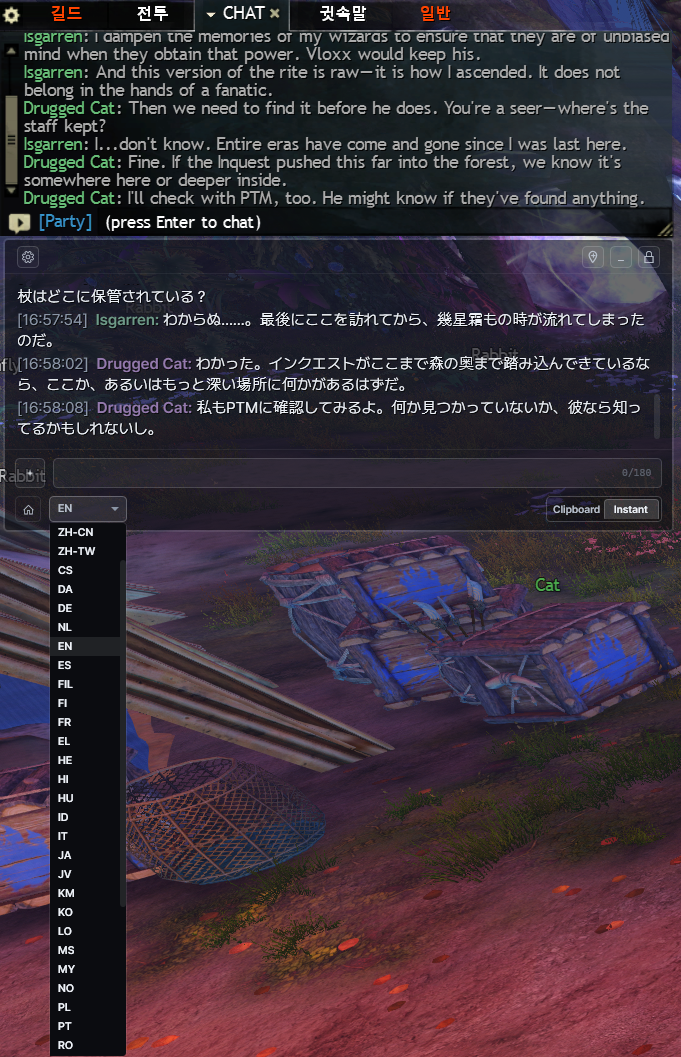
You type "How do I beat this boss?" in your language and press Enter. In Instant mode, CatBridge translates it and sends it right away. Clipboard mode is still available when you want to check or edit first. When your teammate explains the mechanic in their language, CatBridge translates the reply back into your language, so you can keep talking to each other.
입력창에 "이 보스 어떻게 잡아요?"라고 한국어로 쓰고 엔터만 치면 됩니다. 즉시 전송 모드에서는 CatBridge가 영어로 번역해서 바로 게임 채팅으로 보냅니다. 먼저 확인하거나 고치고 싶을 때는 클립보드 모드를 선택할 수 있습니다. 팀원이 자기 언어로 공략을 설명하면 CatBridge가 다시 한국어로 번역해줍니다. 서로 말을 주고받을 수 있습니다.
Send instantly, or copy first
바로 보내거나, 먼저 복사하기
Clipboard mode gives you control: paste into party chat, squad chat, whispers, guild chat, or map chat wherever it makes sense. Instant mode sends the translated line right away when that is what you want.
클립보드 모드는 직접 확인하고 원하는 채널에 붙여넣을 수 있습니다. 파티 채팅, 스쿼드 채팅, 귓속말, 길드 채팅, 맵 채팅 어디든 Ctrl+V로 넣으면 됩니다. 바로 보내고 싶을 때는 즉시 전송을 쓰면 됩니다.
Works everywhere
모든 콘텐츠에서 작동
Chat translation starts automatically while Guild Wars 2 and CatBridge are running. No setup is needed for each activity or channel.
길드워2와 CatBridge가 실행 중이면 채팅 번역이 자동으로 작동합니다. 콘텐츠나 채널별 설정은 필요 없습니다.
Boss mechanics, role assignments, recovery calls
Commander callouts, positioning, mechanic explanations
Team strategy, target calls, rotations
Rally calls, retreat orders, siege coordination
Meta events, world bosses, role sharing
Daily conversations, event plans, casual banter
보스 공략, 역할 분담, 위기 대처
커맨더 콜, 포지셔닝, 기믹 설명
팀 전략, 타겟 콜, 로테이션
집결 호출, 후퇴 명령, 시즈 협동
메타 이벤트, 월드 보스, 역할 공유
일상 대화, 이벤트 계획, 잡담
What really changes
진짜 달라지는 것
The feature itself is simple, but the impact is large. When language is less of a barrier, group play becomes easier. You can ask questions, suggest strategies, react to jokes, and have real conversations with people you play with every day.
기능은 단순하지만 체감은 큽니다. 언어 부담이 줄어들면 파티 플레이가 훨씬 편해집니다. 공략 질문만이 아니라, 농담에 반응하고, 전략을 제안하고, 매일 같이 하는 사람들과 진짜 대화를 나눌 수 있습니다.