Discord Voice Translation
디스코드 음성 통역
Capture the Discord voice session, translate speech, and show captions over the game in the language you choose.
디스코드 음성 세션을 캡처해서, 사용자가 선택한 언어로 자막을 게임 위에 보여줍니다.
What it does
무엇을 해주나요
WvW, raids, PvP, and guild groups often use Discord voice. CatBridge can listen to that Discord voice session and output translated captions in a separate overlay caption window. It is built for live play, so you can keep watching the game while voice chat appears as text. It can also be useful for everyday Discord voice activity outside the game.
전장, 레이드, PVP, 길드 활동에서는 디스코드 음성을 자주 씁니다. CatBridge는 디스코드 음성 세션만 잡아서 번역하고, 별도 오버레이 자막창에 출력합니다. 게임 화면을 보면서 음성대화를 자막으로 읽을 수 있습니다. 게임 중뿐 아니라 평상시 디스코드 음성 활동에서도 활용할 수 있습니다.
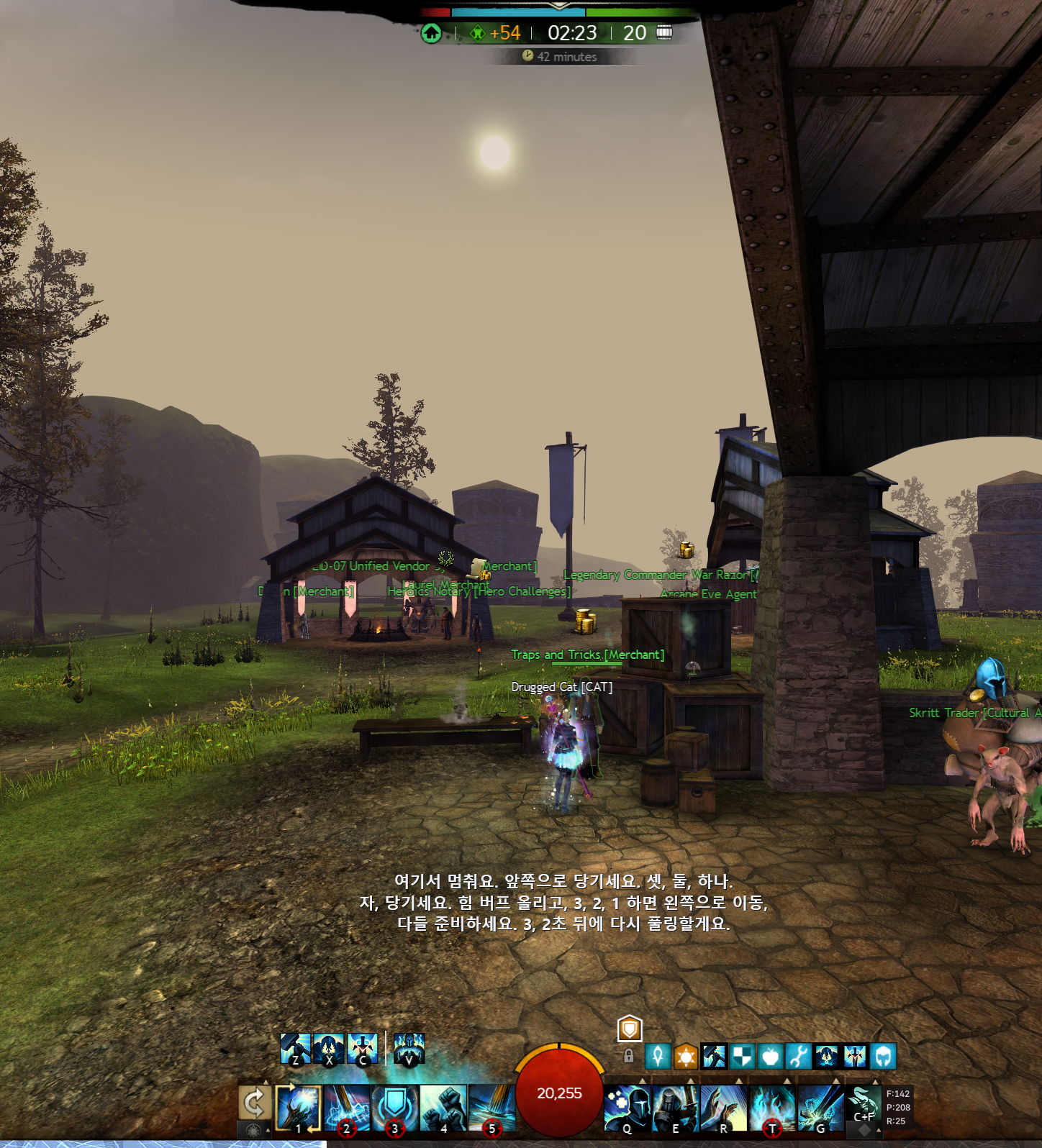
Translation in the language you choose
선택한 언어로 표시합니다
The output is not locked to Korean. Choose the target language in CatBridge and the Discord caption window uses that language. The Portuguese example below shows the same feature using a different target language.
한국어만 되는 기능이 아닙니다. CatBridge에서 목표 언어를 고르면 디스코드 자막창도 그 언어로 표시됩니다. 아래는 포르투갈어로 표시한 예시입니다.
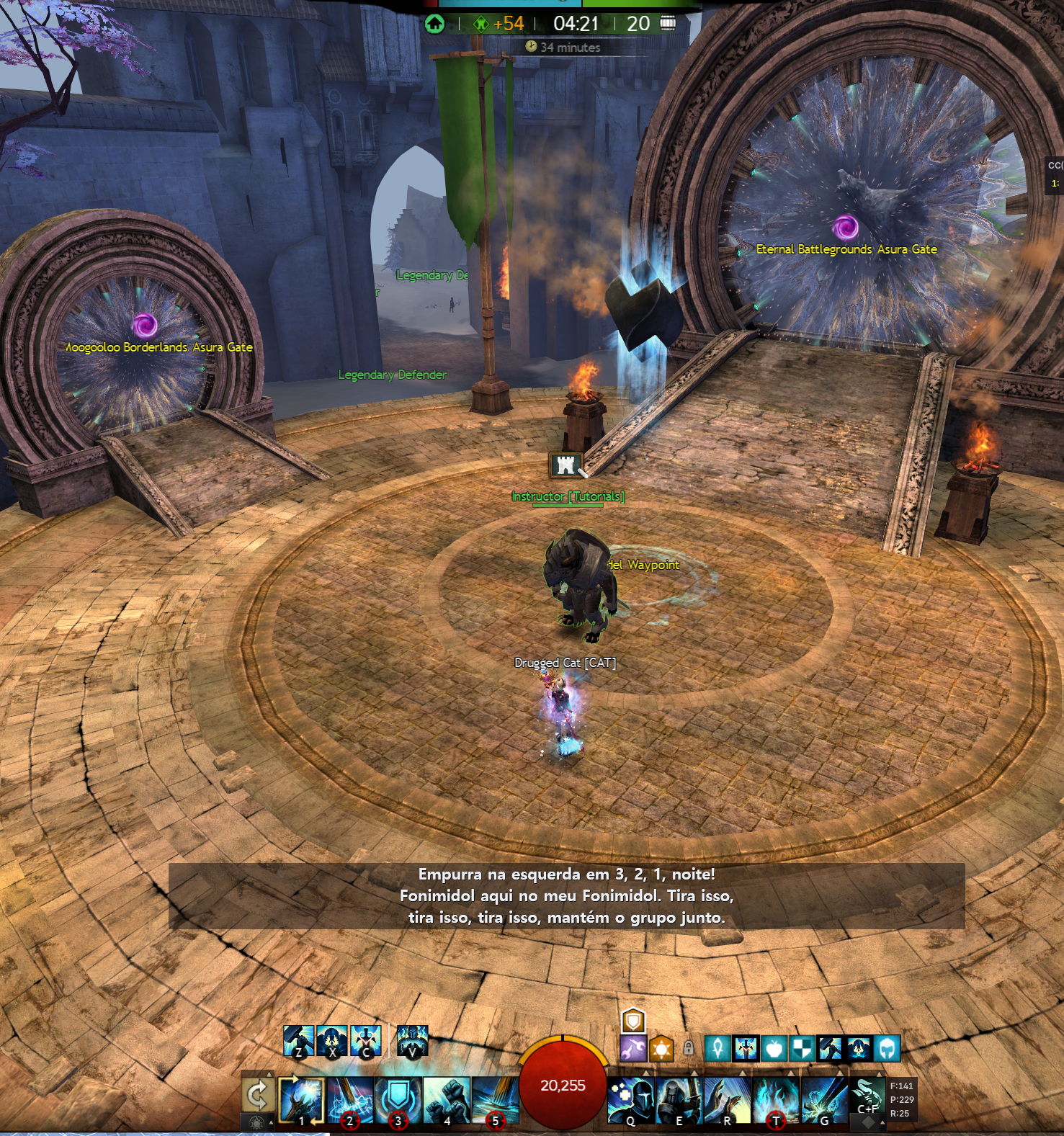
Only Discord audio
디스코드 소리만 캡처
CatBridge precisely captures the Discord desktop app voice session. Game effects, music, YouTube, and other app sounds are blocked at the source, so outside noise does not enter the translation.
CatBridge는 디스코드 데스크톱 앱의 음성 세션을 정확히 캡처합니다. 게임 효과음, 음악, 유튜브, 다른 프로그램 등 다른 잡음이 들어가는 것을 원천 차단합니다.
Good for
이럴 때 좋습니다
- WvW commander voice
- Raid strategy explanations and callouts
- Guild voice chat in another language
- Portuguese, Korean, Japanese, English, and other target languages
- 전장 커맨더 음성
- 레이드 공략 설명 및 지시
- 다른 언어로 진행되는 길드 음성 채팅
- 한국어, 포르투갈어, 일본어, 영어 등 사용자가 선택한 목표 언어
Not for
이런 용도는 아닙니다
- Recording your microphone
- Capturing every sound on the PC
- Replacing normal chat translation
- 내 마이크 녹음
- PC의 모든 소리 캡처
- 일반 채팅 번역 대체
Overlay controls
자막창 설정
You can change the caption window line count and background opacity. Turn on lock after positioning it, and clicks pass through so it does not interfere with game controls.
자막창의 줄 수와 배경 투명도를 조절할 수 있습니다. 위치를 잡은 뒤 잠금을 켜면 클릭이 통과해서 게임 조작을 방해하지 않습니다.
A Groq API key takes about ten seconds to create after Google sign-in. It is not the recommended translation engine, but it unlocks free speech recognition features such as Discord voice translation and Voice to Chat. On the current free allowance, Discord voice translation is roughly 2 to 8 hours per day depending on mode and usage. For the translation stage, choose the AI engine that fits your budget and preferred setup.
Groq API 키는 구글 로그인 후 생성 버튼만 누르면 10초 정도면 만들 수 있습니다. 번역 품질 때문에 추천하는 엔진은 아니지만, 디스코드 음성 통역과 Voice to Chat 같은 무료 음성 인식 기능을 열려면 먼저 등록해두는 편이 좋습니다. 현재 무료 한도 기준으로 디스코드 음성 통역은 모드와 사용량에 따라 하루에 대략 2~8시간 정도 사용할 수 있습니다. 번역 단계에서는 비용, 속도, 품질에 맞춰 원하는 AI 엔진을 고르면 됩니다.
Setup notes
설정 참고
- Only the Discord desktop app is supported. Browser Discord is not supported.
- In Discord's Voice & Video settings, set the output device to the Windows default output device.
- Keep your API keys in CatBridge settings.
- Groq gives a useful free daily allowance for speech recognition, roughly 2 to 8 hours per day for Discord voice translation depending on mode and usage.
- Use the AI engine that fits your translation quality, speed, and budget.
- Gemini remains a simple high-quality option.
- 디스코드 데스크톱 앱만 지원합니다. 브라우저 디스코드는 지원하지 않습니다.
- 디스코드 앱의 음성 및 비디오 설정에서 출력 장치를 Windows 기본 출력 장치로 설정하는 것을 권장합니다.
- API 키는 CatBridge 설정 페이지에 등록합니다.
- Groq는 음성 인식에 쓸 수 있는 무료 일일 한도를 제공합니다. 디스코드 음성 통역은 모드와 사용량에 따라 하루에 대략 2~8시간 정도 사용할 수 있습니다.
- 유료 AI 번역은 품질, 속도, 비용에 맞춰 원하는 엔진을 고르면 됩니다.
- Gemini는 여전히 설정이 쉽고 품질이 좋은 선택지입니다.