CatBridge

Play Guild Wars 2 in your language

길드워2를 내 언어로 플레이하세요

Story dialogue, party and squad chat, screen OCR, Discord voice translation, TTS, voice chat input, custom cursors, and WvW combat reports in one Guild Wars 2 tool.

스토리 대사, 파티와 스쿼드 채팅, 화면 OCR, 디스코드 음성 통역, TTS, 음성 채팅 입력, 커스텀 커서, 전장 리포트까지 한 프로그램에서 처리합니다.

The App
프로그램

Choose a language and translation engine, then start playing

언어와 번역 엔진만 고르면 바로 시작할 수 있습니다

CatBridge runs while Guild Wars 2 is open. Menus and settings can use several UI languages. Even if a UI language is not available, chat and dialogue translation still work.

CatBridge는 길드워2를 켜둔 상태에서 함께 실행하는 번역 도구입니다. 메뉴와 설정은 여러 언어로 볼 수 있고, 아직 UI가 번역되지 않은 언어라도 채팅과 대사 번역은 그대로 사용할 수 있습니다.

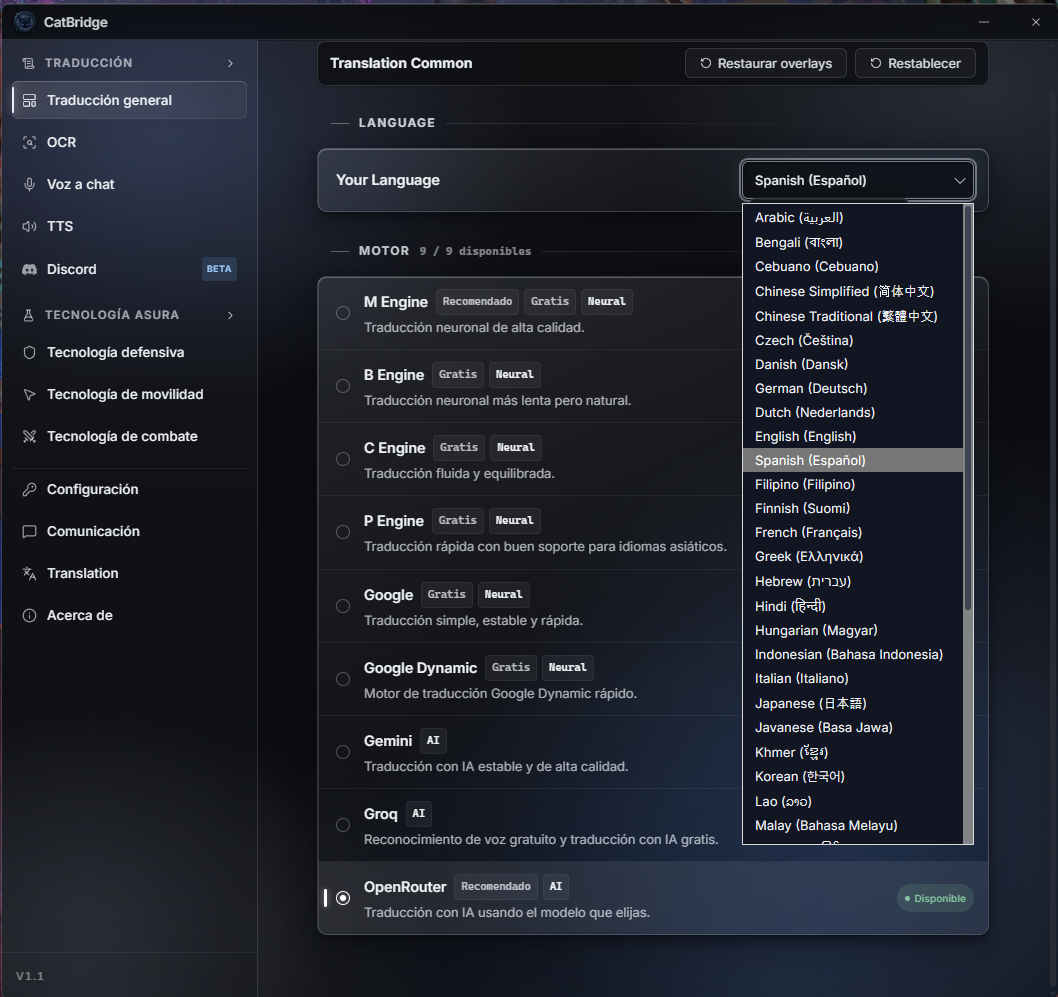
CatBridge language and engine settings
CatBridge initial setup page. The UI changes to the language you choose when that UI locale is available. If the UI locale is not available, all features still work.
CatBridge 초기 설정 페이지. 선택한 언어에 따라서 해당 언어로 UI 언어도 변경됩니다. UI 언어가 지원되지 않더라도, 모든 기능은 작동합니다.
Translation
번역

Story, chat, and your own messages

스토리, 채팅, 내가 쓰는 채팅까지

NPC dialogue and party or squad chat are translated natively. Your own message can be translated before you send it.

NPC 대사와 파티/스쿼드 채팅은 네이티브로 번역합니다. 내가 쓴 채팅도 선택한 언어로 번역해서 전송할 수 있습니다.

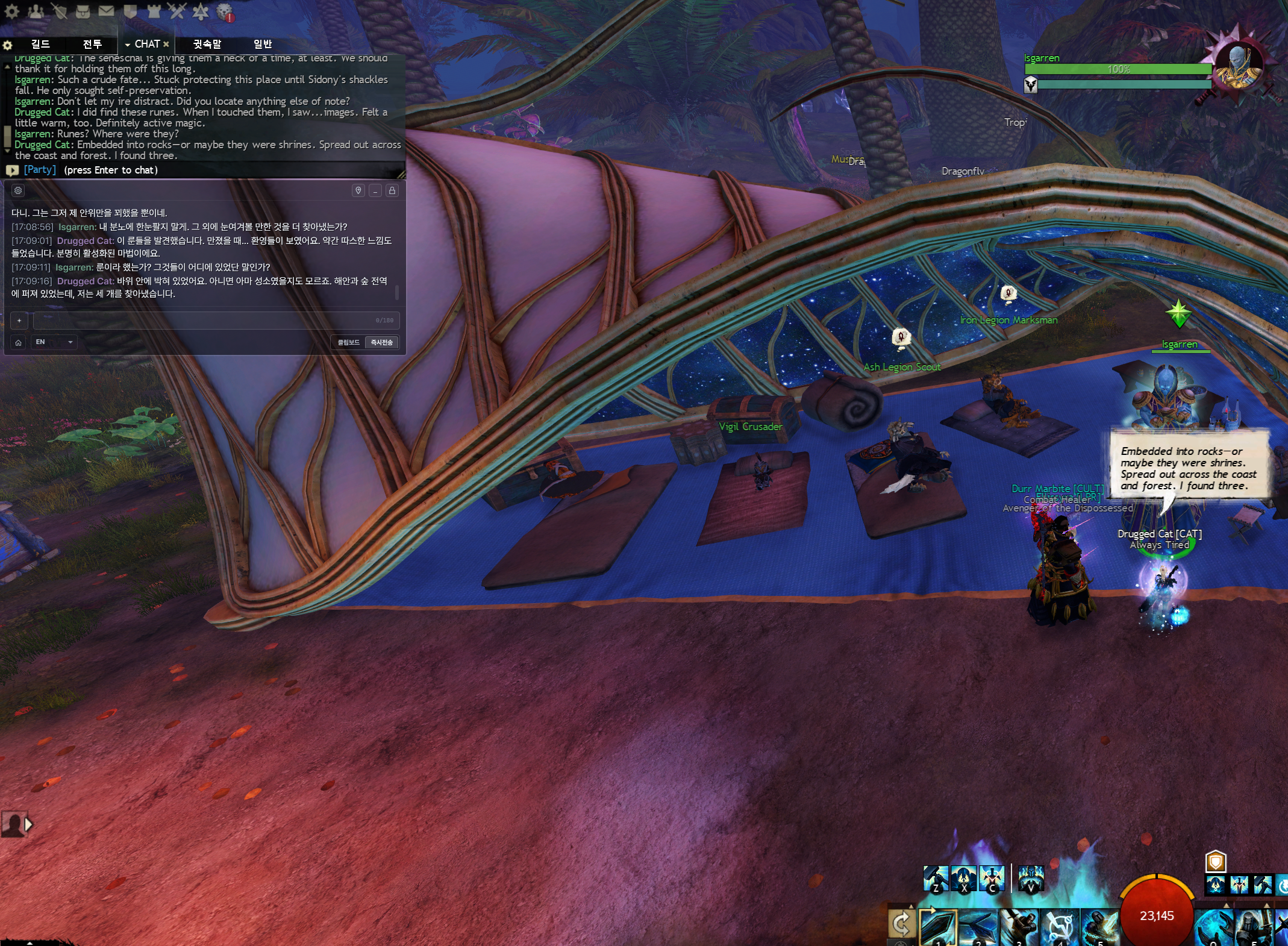
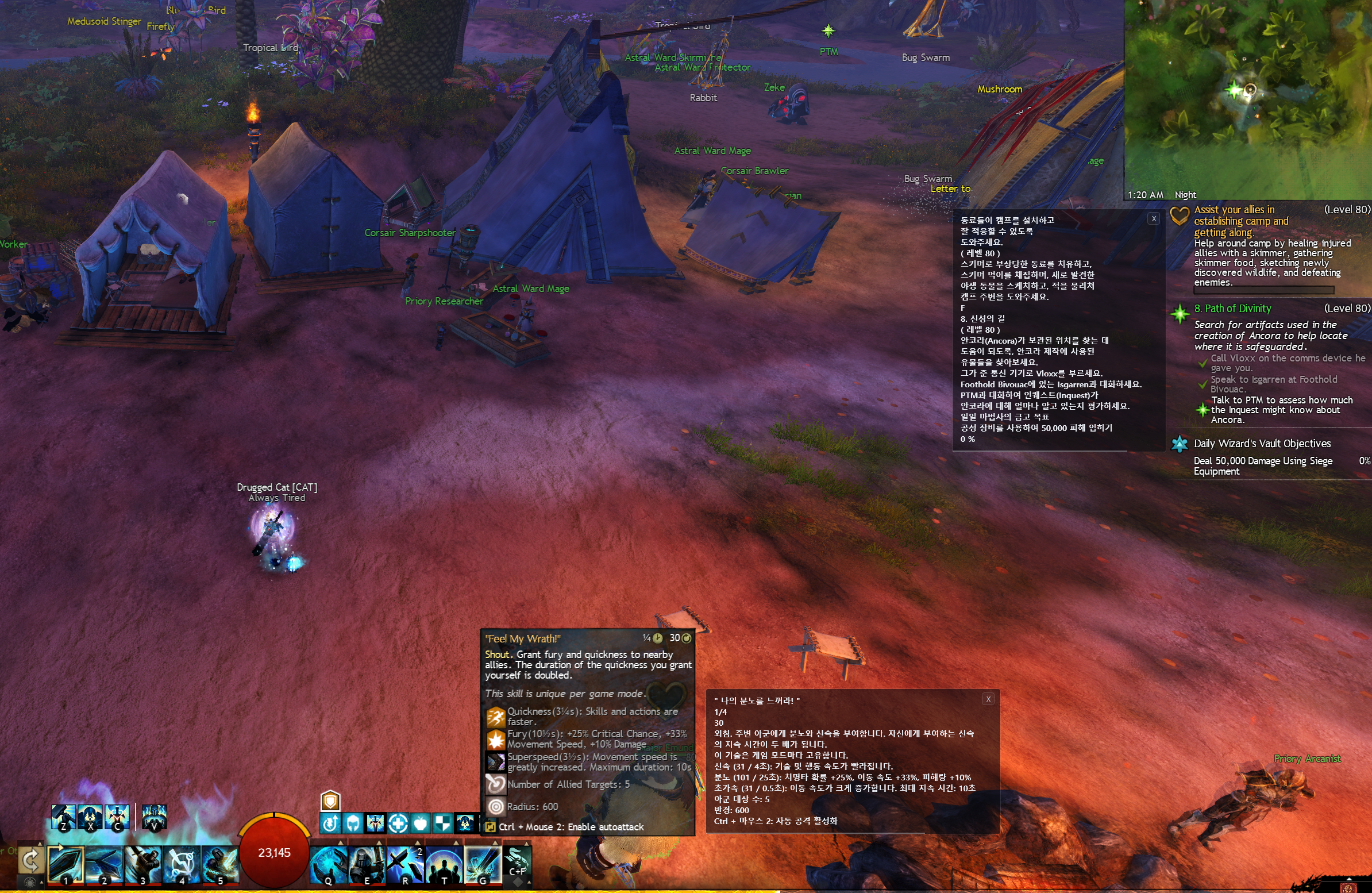
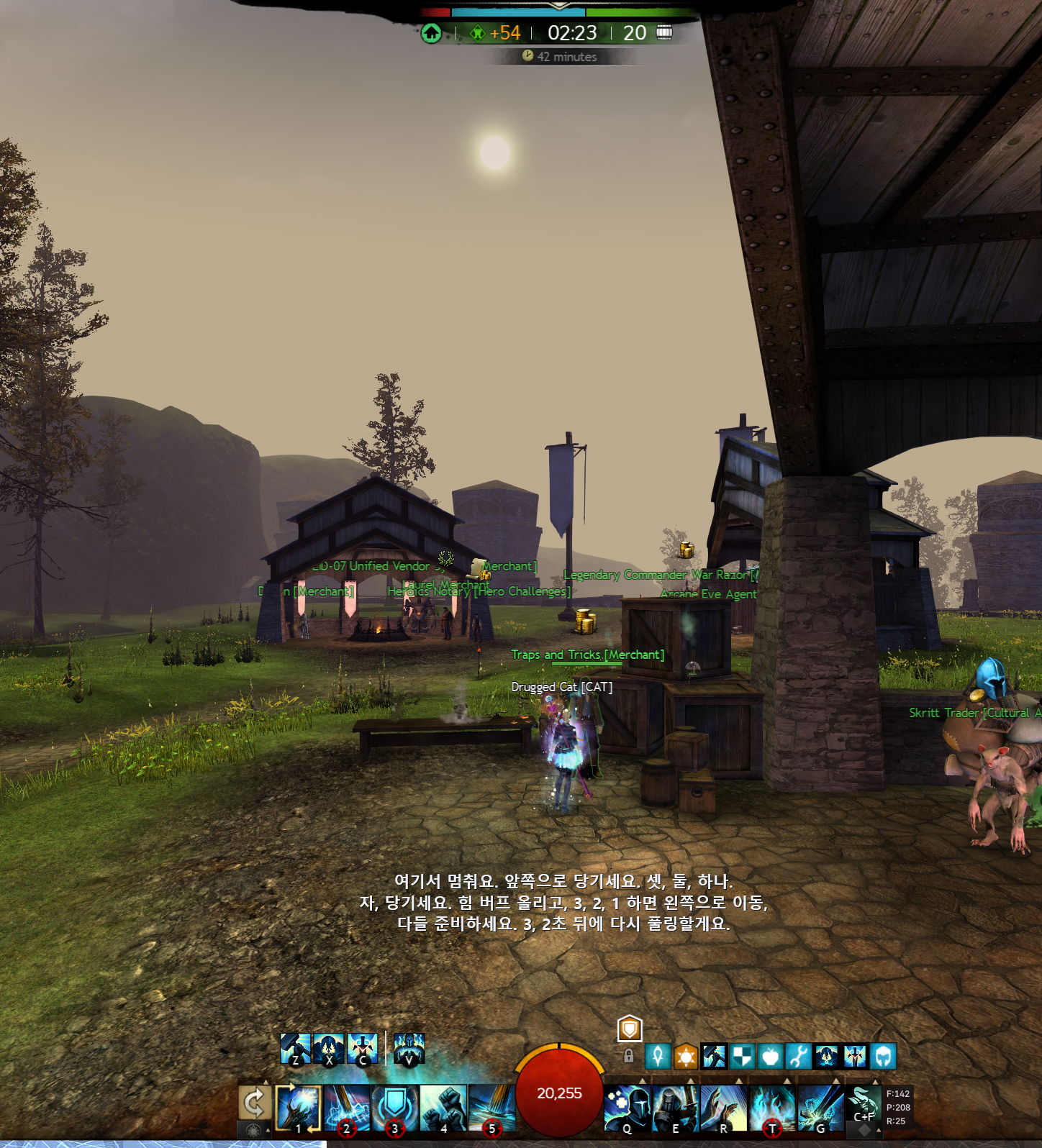
CatBridge story dialogue translated into Korean
Story translation keeps NPC lines readable while the game stays open.
스토리 번역은 게임 화면 위에서 NPC 대사를 바로 읽을 수 있게 보여줍니다.
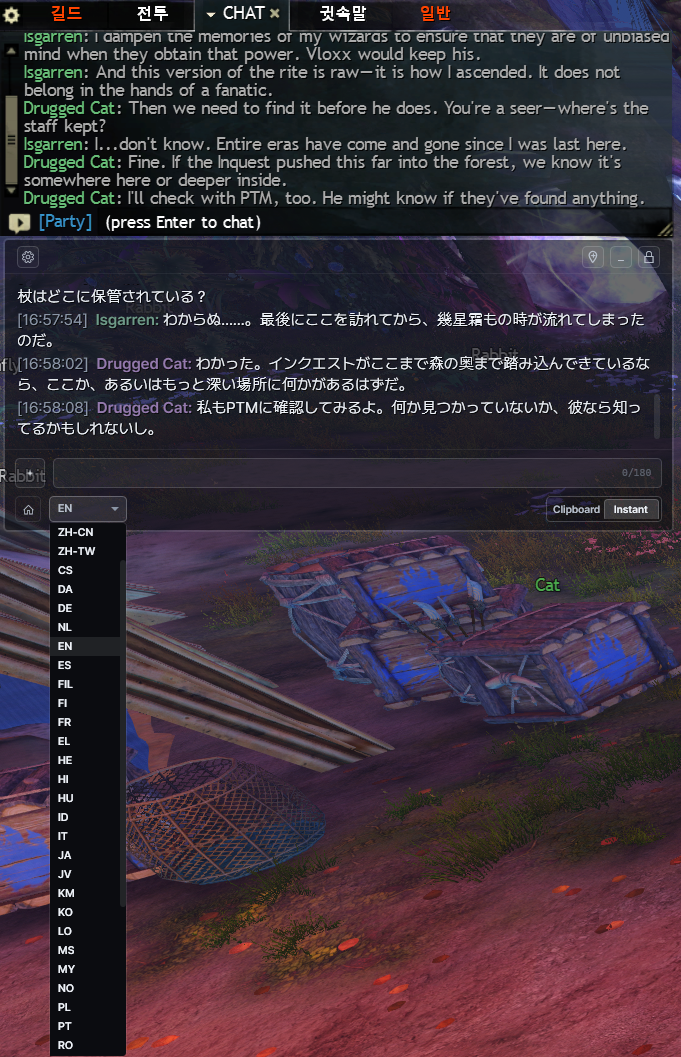
CatBridge translated outgoing chat input
Outgoing chat can be sent instantly in the selected language, or copied first when you want to check it.
입력 번역은 선택한 언어로 바꾼 뒤 바로 보내거나, 먼저 확인하고 싶을 때 클립보드에 복사할 수 있습니다.
In Action
실제 화면

See it in action

이렇게 작동합니다

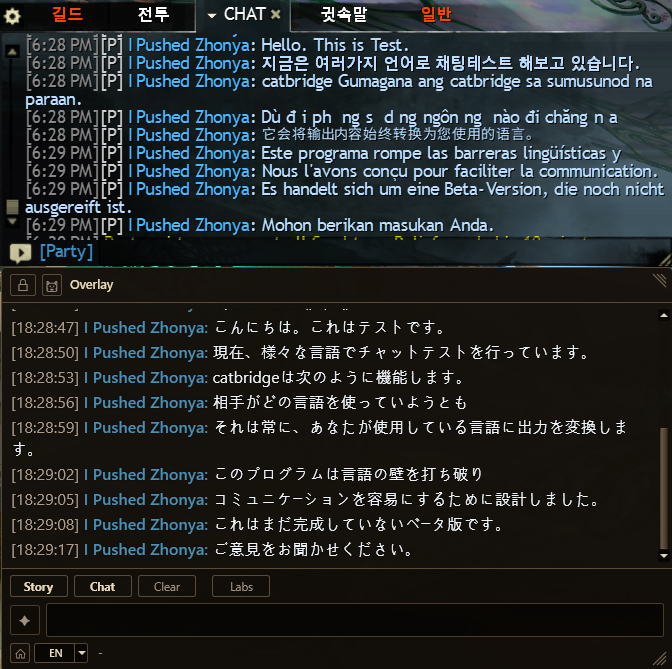
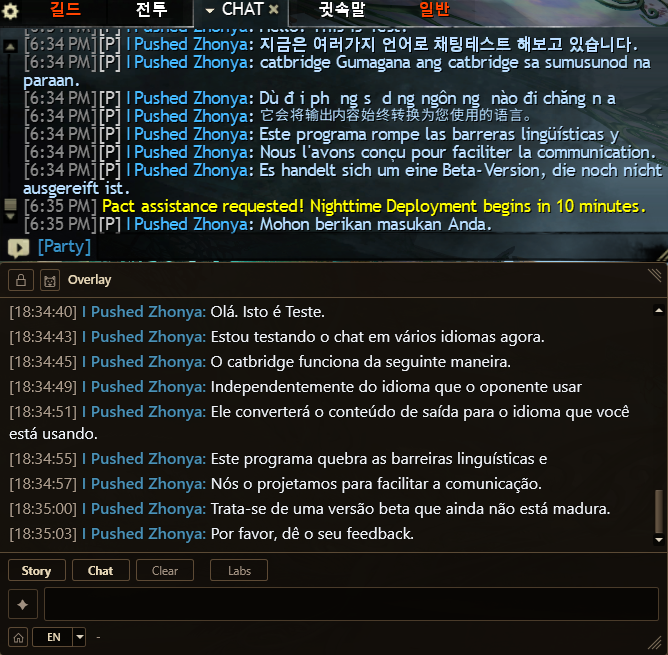
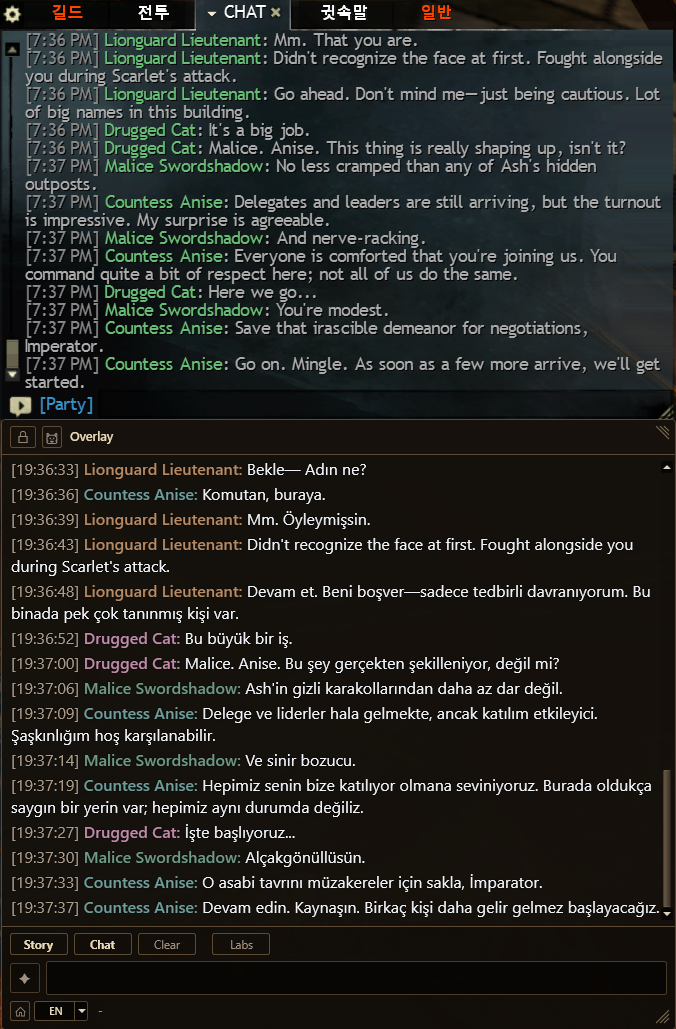
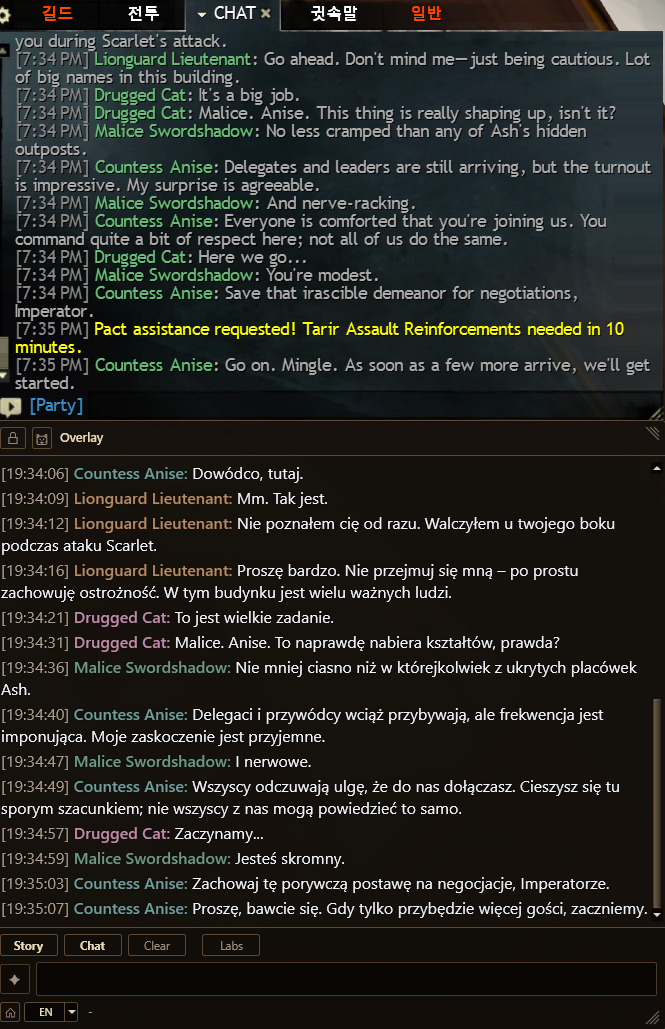
Multilingual translation examples from earlier CatBridge builds.

여러 언어로 번역되는 예시입니다.

old UI
Party chat translated into Japanese
Party chat
Japanese
파티 채팅
일본어
old UI
Party chat translated into Portuguese
Party chat
Portuguese
파티 채팅
포르투갈어
old UI
NPC story dialogue translated into Turkish
NPC story
Turkish
NPC 스토리
터키어
old UI
NPC story dialogue translated into Polish
NPC story
Polish
NPC 스토리
폴란드어

Old-version CatBridge screenshots. The images above are examples. CatBridge supports dozens of languages through free translation engines and optional AI engines, including English, French, German, Spanish, Russian, Arabic, and Thai.

구버전 CatBridge 화면입니다. 위는 예시입니다. CatBridge는 무료 번역 엔진과 선택형 AI 엔진을 통해 영어, 프랑스어, 독일어, 스페인어, 러시아어, 아랍어, 태국어를 포함한 수십 개 언어를 지원합니다.

Now
현재

More than chat translation

채팅 번역만 하는 프로그램이 아닙니다

CatBridge now covers native translation, OCR, Discord voice translation, cursor tools, and WvW reports.

CatBridge는 네이티브 번역, OCR, 디스코드 음성 통역, 커서 도구, 전장 리포트까지 지원합니다.

CatBridge OCR translating Guild Wars 2 screen text
OCR translates text you drag on screen, and can also translate a saved chat area with a hotkey.
OCR은 화면에서 드래그한 글자를 번역합니다. 채팅창 영역을 저장해두면 단축키로 일반 채팅, 귓말, 맵 채팅, 길드 채팅도 번역할 수 있습니다.
CatBridge Discord voice translation over Guild Wars 2
Discord voice translation captures the Discord voice session and shows captions in the language you choose.
디스코드 음성 통역은 디스코드 음성 세션만 잡아서, 사용자가 선택한 언어로 자막을 보여줍니다.
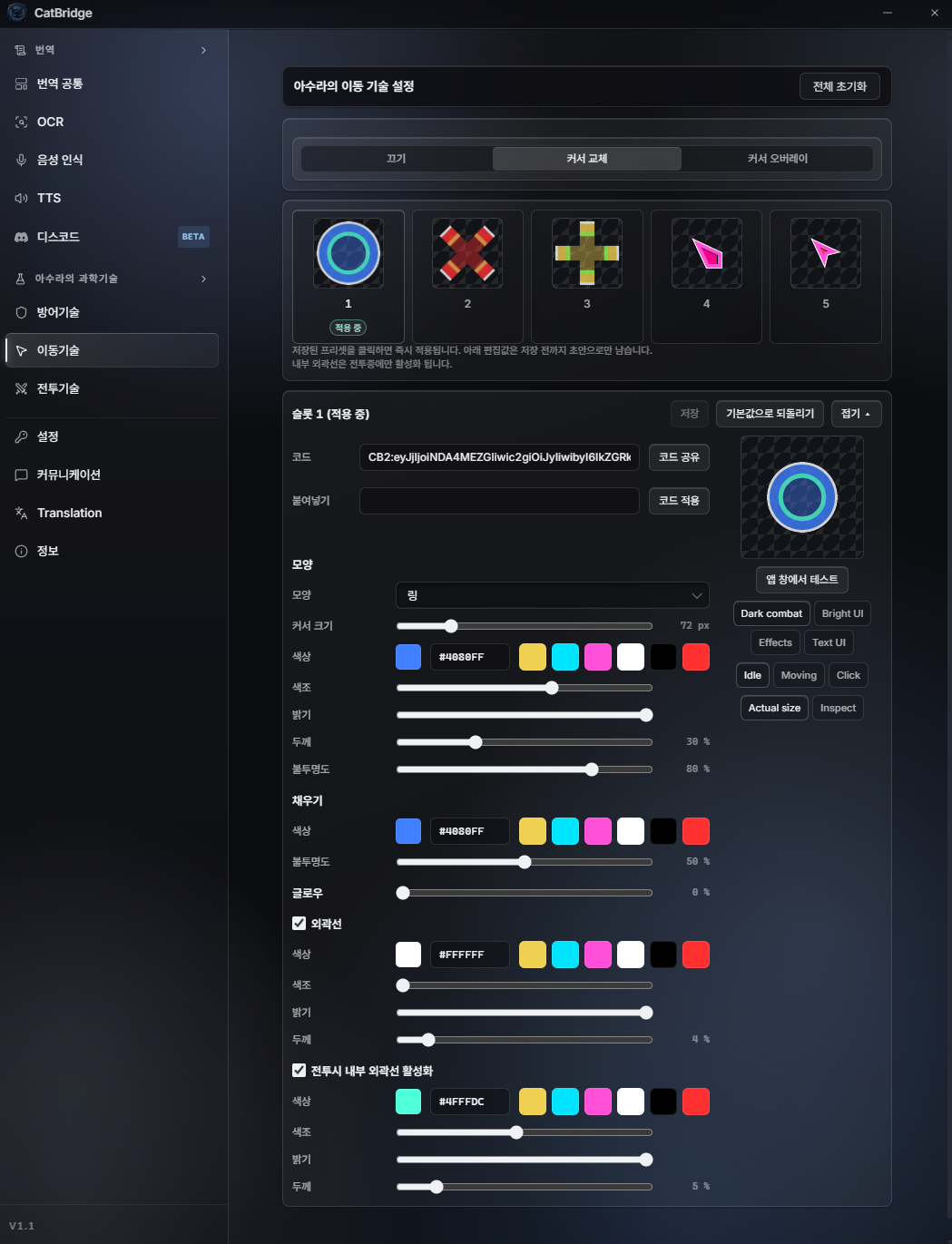
CatBridge Mobility Tech cursor editor
Mobility Tech replaces the GW2 cursor. You can customize it, share presets by code, and change colors between combat and non-combat states.
이동기술은 길드워2 마우스 커서를 교체합니다. 커서를 직접 커스텀하고, 코드로 다른 사람과 공유할 수 있습니다. 커스텀 설정에 따라 전투/비전투 상태에서 색상이 바뀝니다.
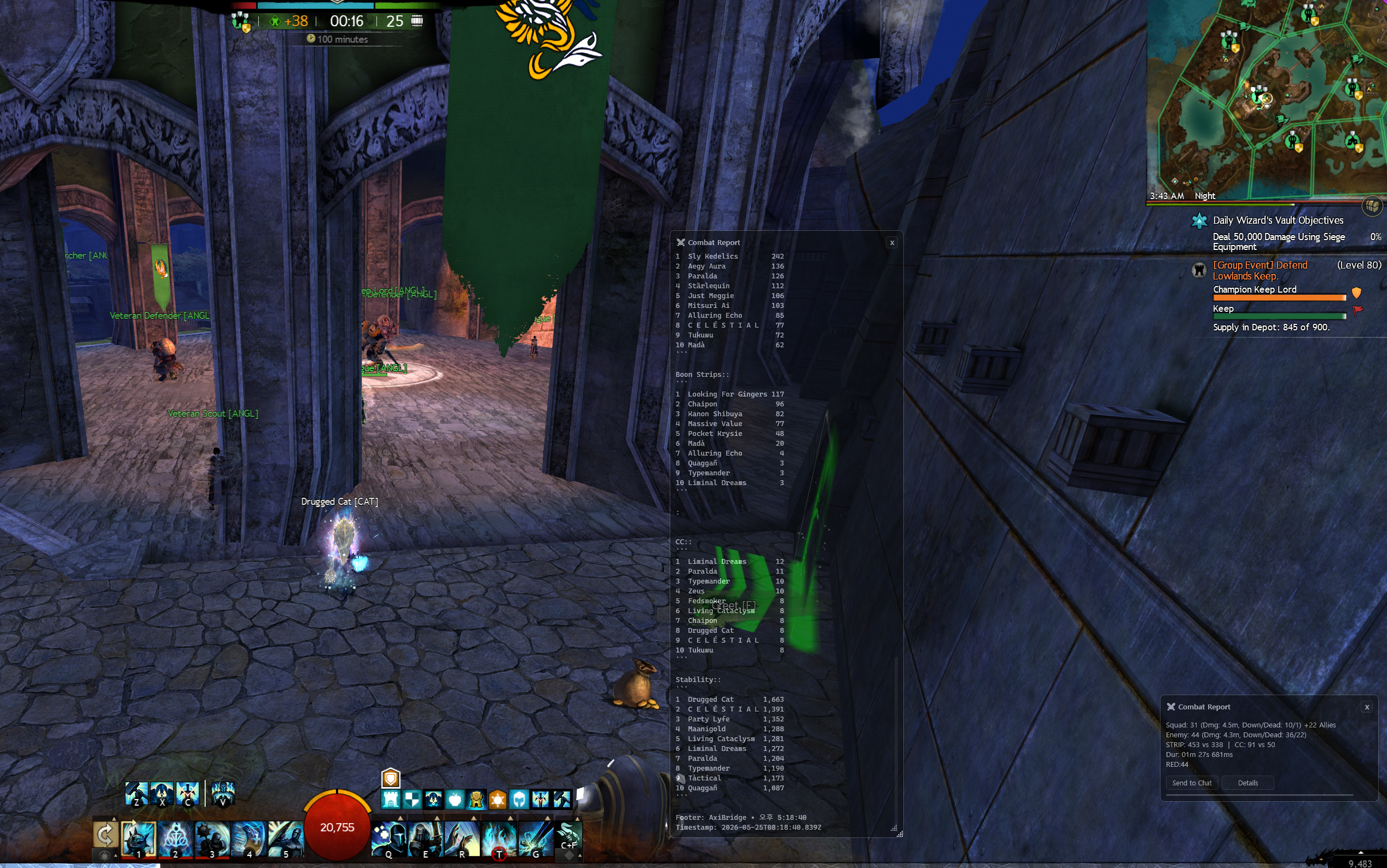
CatBridge WvW combat report overlay
Combat Tech uses AxiBridge to share quick WvW combat reports in chat or view detailed results in an overlay window.
전투기술은 AxiBridge를 설치하면 전장에서 퀵 전투 리포트를 채팅으로 공유하거나, 자세한 내용을 오버레이 창에서 확인할 수 있습니다.
Features
주요 기능

Translation first, useful tools around it

여러가지 번역 기능과 플레이에 도움이 되는 유틸리티까지

Understand story, talk with players, translate screen text, and handle voice without leaving the game.

스토리를 이해하고, 다른 언어의 플레이어와 대화하고, 화면 글자를 번역하고, 음성까지 게임 안에서 처리합니다.

NPC & Story Translation
NPC dialogue appears in real time on a dedicated overlay. AI engines can use CatBridge's 273-character persona dictionary to keep character tone more consistent.
Translation
Two-Way Chat Translation
Party and squad messages are translated from game data. Type in your language, choose a target language, then copy it or send it instantly. From V1.1.2, an experimental All Chat Translation mode can also be enabled after accepting the in-app notice.
Translation · Bidirectional
OCR Screen Translation
Drag over objectives, skills, achievements, dialogue choices, or chat channels that native translation cannot read. OCR is fast and recognition is strong.
OCR · Screen text
Discord Voice Translation
Capture the Discord voice session, translate speech, and show captions in the language you choose. Lock the caption window for click-through play.
Voice · Translation
Mobility Tech
Replace or overlay the GW2 cursor, customize shape and color, and share cursor presets with a code.
Cursor · Free tool
Combat Tech
With AxiBridge, WvW fights can produce quick chat reports and detailed combat windows inside the game.
WvW · Reports
API & Engine Setup
Start free with M, B, C, P, or Google. Add the AI engine you prefer when you want stronger translation.
Engine
NPC & 스토리 번역
NPC 대사를 전용 오버레이에 실시간 번역. AI 엔진을 쓰면 CatBridge에 탑재된 273명 캐릭터 페르소나 사전이 작동해 NPC마다 고유한 말투까지 살립니다.
번역
채팅 양방향 통역
파티와 스쿼드 채팅은 게임 데이터로 읽어서 번역합니다. 내가 쓴 문장은 원하는 언어로 바꾼 뒤 바로 보내거나, 먼저 확인하고 싶을 때 클립보드에 복사할 수 있습니다. V1.1.2부터는 앱 내 안내에 동의한 경우 실험적 모든 채팅 번역 기능도 켤 수 있습니다.
번역 · 양방향
화면 OCR 번역
목표, 스킬, 업적, 선택지, 네이티브 번역이 읽지 못하는 채팅 채널을 드래그해서 번역합니다. OCR은 빠르고 인식률도 좋습니다.
OCR · 화면 글자
디스코드 음성 통역
디스코드 음성 세션만 캡처해서 사용자가 선택한 언어로 자막을 보여줍니다. 자막창을 잠그면 클릭이 통과해서 게임 조작을 방해하지 않습니다.
음성 · 통역
이동기술 (커서 도구)
길드워2 마우스 커서를 교체합니다. 커서를 직접 커스텀하고, 코드로 다른 사람과 공유할 수 있습니다. 커스텀 설정에 따라 전투/비전투 상태에서 색상이 바뀝니다.
커서 · 무료 도구
전투기술 (WvW 리포트)
AxiBridge를 설치하면 전장에서 퀵 전투 리포트를 채팅으로 공유하거나, 자세한 내용을 오버레이 창에서 확인할 수 있습니다.
전장 · 리포트
API와 번역 엔진
M, B, C, P, Google은 무료로 바로 사용 가능합니다. AI 번역은 원하는 엔진을 골라 쓸 수 있습니다.
엔진
Also Included
함께 들어 있는 기능

Small tools you will actually use

작지만 자주 쓰게 되는 기능들

Voice to Chat

음성 인식 채팅

Hold a key, speak, and CatBridge types it for you. It can send the recognized text as-is or translate it into the selected language first.

키를 누르고 말하면 CatBridge가 채팅창에 입력합니다. 말한 그대로 보낼 수도 있고, 선택한 언어로 번역해서 보낼 수도 있습니다.
TTS

TTS

Choose what to read aloud, such as NPC lines or party chat. Useful when party chat is easy to miss during play.

NPC 대사나 파티 채팅처럼 읽어줄 대상을 고릅니다. 전투 중 파티 채팅을 자주 놓치는 사람에게 유용합니다.

Communication + Translation

커뮤니케이션 + 번역

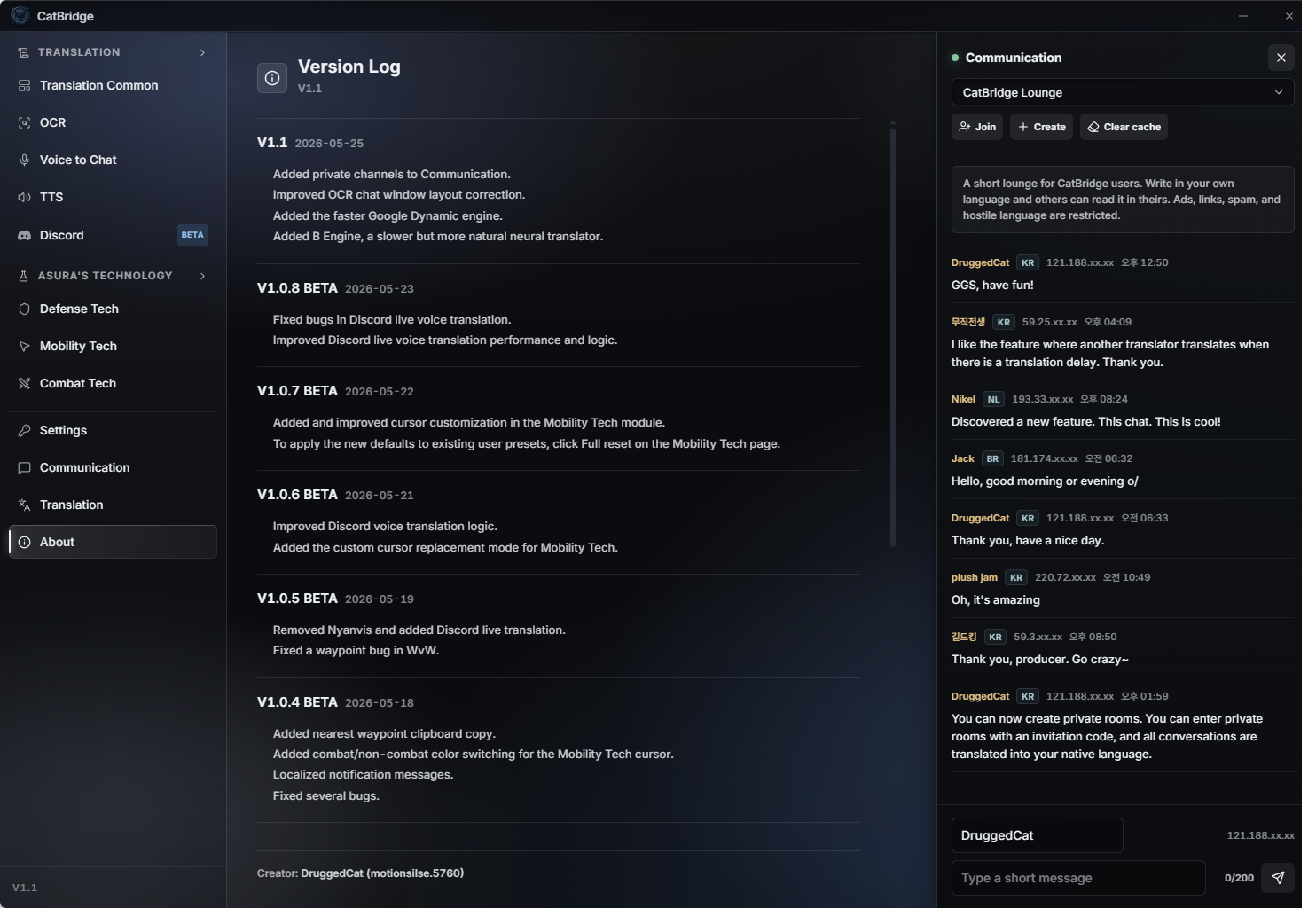
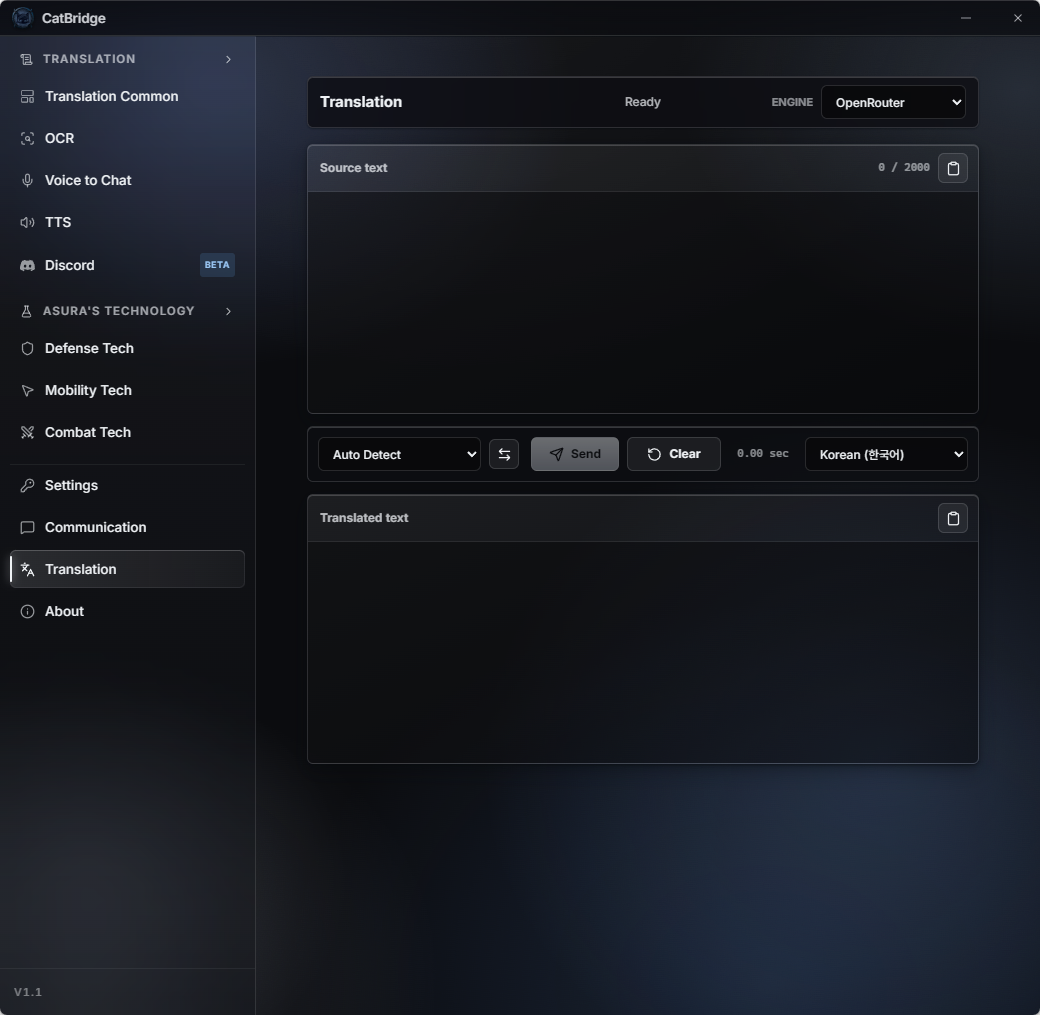
Use the lounge or private invite-code rooms for translated chat, and use Translation as a quick engine test or normal translator.

라운지나 초대코드 비공개방에서 각자 자기 언어로 채팅하고, 번역 탭에서는 엔진별 반응 속도와 번역 품질을 테스트하거나 일반 번역기로 쓸 수 있습니다.

Nyarchive

냥카이브

A Gemini-only Guild Wars 2 chatbot opened from the input area. Beginners and new players can ask GW2 questions directly in-game.

입력창에서 여는 Gemini 전용 길드워2 챗봇입니다. 초보자나 입문자들이 길드워2에 대해서 궁금한 부분을 게임 안에서 직접 물어볼 수 있습니다.
CatBridge translation tool
Translation tool and engine testing.
번역기와 엔진 테스트 화면.
CatBridge communication panel
Translated lounge and private-room communication.
자동 번역되는 라운지와 비공개방.
Engines
번역 엔진

Choose the engine that fits how you play

플레이 스타일에 맞는 엔진을 고르세요

CatBridge itself is free, and you can start without any API key. The free machine translation engines are enough to understand the gist. If you want natural story lines, better chat translation, and persona-aware NPC dialogue, move up to an AI engine.

CatBridge 자체는 무료이고, API 키 없이도 바로 시작할 수 있습니다. 무료 기계번역 엔진만으로도 내용을 이해하는 데는 충분히 쓸 수 있습니다. 더 자연스러운 스토리, 정확한 채팅 번역, NPC 페르소나 번역까지 원하면 AI 엔진을 쓰면 됩니다.

The short version

짧게 정리하면

Use the free engines if you do not want to spend anything. Add an AI engine such as OpenRouter or Gemini when you want stronger translation. Get Create a Groq key first if you plan to use Discord voice translation or Voice to Chat.

돈을 쓰지 않을 거면 무료 엔진을 쓰면 됩니다. 더 자연스러운 번역이 필요하면 OpenRouter나 Gemini 같은 AI 엔진을 골라 쓰면 됩니다. 디스코드 음성 통역이나 음성 인식 채팅을 쓸 거라면 Groq는 먼저 발급해두는 쪽이 좋습니다.

Free
M / B / C / P / Google

Five free machine translation engines. M is the usual recommendation, but languages and situations vary, so B, C, P, or Google may fit some cases better.

No signup · No payment · try M first
AI
OpenRouter

Use OpenRouter when you want to choose from many AI models and control cost. Pick the preset that fits your language and budget.

Many models · paid AI translation
Best
Gemini

The simplest high-quality option. If you want an easy setup and do not mind paying more, use Gemini.

Best quality · easiest setup · higher cost
Voice
Groq Free API

Not the recommended translation engine, but worth creating first because it unlocks free speech recognition for Discord voice translation and Voice to Chat.

10-second key · free daily allowance
무료
M / B / C / P / Google

다섯 가지 무료 기계번역 엔진입니다. 보통은 M엔진을 먼저 추천하지만, 언어나 상황에 따라 B, C, P, Google이 더 잘 맞을 수도 있습니다.

가입 불필요 · 결제 불필요 · M부터 테스트
AI
OpenRouter

여러 AI 모델 중에서 원하는 엔진을 고르고, 비용을 조절하고 싶을 때 쓰면 됩니다.

여러 모델 · 유료 AI 번역
최고
Gemini

설정이 쉽고 품질이 좋은 AI 옵션입니다. 비용이 조금 더 나와도 편하게 쓰고 싶다면 Gemini가 맞습니다.

최고 품질 · 쉬운 설정 · 비용 높음
음성
Groq 무료 API

번역 품질 때문에 추천하는 엔진은 아니지만, 디스코드 음성 통역과 Voice to Chat의 무료 음성 인식을 위해 먼저 발급해두면 좋습니다.

10초 발급 · 무료 일일 한도
Create Groq first

A Groq API key is free and takes about ten seconds to create after Google sign-in. It is used for Discord voice translation and Voice to Chat, so it is a useful first setup step even if you choose another engine for translation quality.

Groq부터 먼저 발급받으세요

Groq API 키는 무료이고 구글 로그인 후 생성 버튼만 누르면 10초 정도면 발급받을 수 있습니다. 디스코드 음성 통역과 Voice to Chat 음성 인식에 쓰이므로, 번역 엔진은 다른 것을 쓰더라도 먼저 만들어두는 것을 추천합니다.

→ See the API & engine setup guide

→ API와 번역 엔진 설정 보기

Architecture
작동 원리

How it works

작동 구조

CatBridge is a standalone app that receives game data through ArcDPS.

ArcDPS가 게임 데이터를 잡아서 CatBridge로 넘기는 구조입니다.

Guild Wars 2
ArcDPS
Unofficial Extras
arcdps_catbridge.dll
CatBridge
  • ArcDPS hooks into the game client to collect data
  • Unofficial Extras extracts additional info (squad, chat, etc.)
  • arcdps_catbridge.dll bridges that data to CatBridge via Named Pipe
  • CatBridge handles translation, overlay rendering, and AI features
  • ArcDPS가 게임 데이터를 수집
  • Unofficial Extras가 스쿼드, 채팅 같은 추가 정보를 뽑아냄
  • arcdps_catbridge.dll이 Named Pipe로 CatBridge에 전달
  • CatBridge가 번역, 오버레이, AI 기능 전부 처리
All three must be in the same folder

ArcDPS, Unofficial Extras, and arcdps_catbridge.dll must all live in the same directory. If you use an addon manager like Nexus, ArcDPS may be in a subfolder — make sure the bridge DLL is placed alongside the actual ArcDPS installation.

세 파일 모두 같은 폴더에 넣으세요

ArcDPS, Unofficial Extras, arcdps_catbridge.dll이 한 폴더에 있어야 작동합니다. Nexus 같은 애드온 매니저를 쓰면 ArcDPS가 서브 폴더에 깔릴 수 있으니, 브릿지 DLL도 ArcDPS가 실제로 있는 곳에 넣어야 합니다.

Ready to play in your language?

지금 바로 시작하세요

Download CatBridge, copy it into your GW2 folder, and start playing. It takes less than two minutes.

다운로드 → 길드워2 폴더에 압축 해제 → 실행. 2분이면 됩니다.