Break the language barrier in Guild Wars 2
길드워2, 이제 내 언어로 플레이하세요
Real-time NPC translation, two-way party chat, an in-game AI assistant, and Discord voice summaries — all in one overlay.
NPC 대사, 파티 채팅, 디스코드 음성까지 전부 번역해주는 오버레이 하나면 됩니다.
This is CatBridge
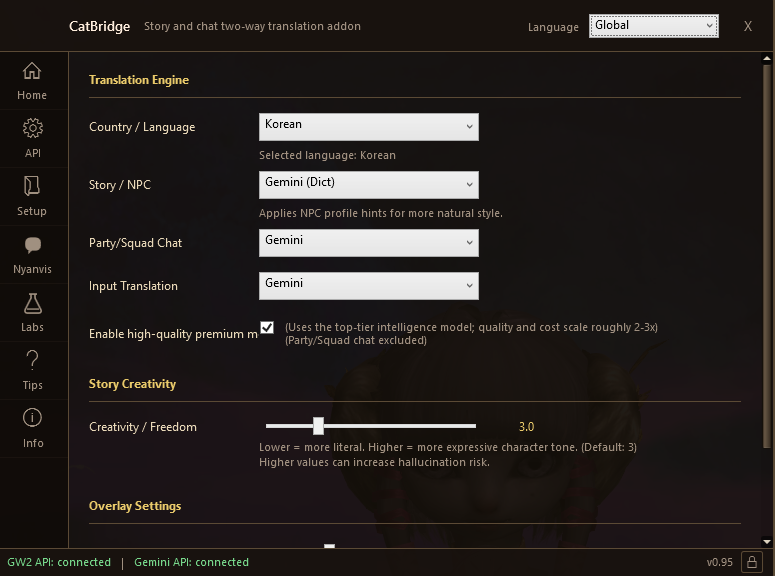
CatBridge는 이렇게 생겼습니다
A small companion app that runs alongside Guild Wars 2. Launch it, pick your language, and translation is live.
길드워2 옆에서 같이 돌아가는 작은 프로그램입니다. 실행하고, 언어만 고르면 번역이 바로 시작됩니다.
See it in action
이렇게 작동합니다
Real party chat and NPC dialogue — translated live into every language you play in.
같은 파티 채팅, 같은 NPC 대사 — 여러 언어로 실시간 번역되는 모습.
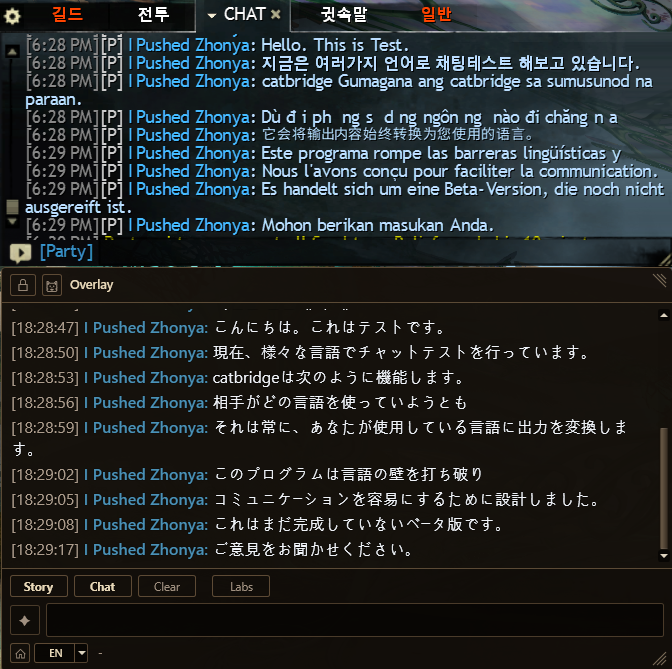
Japanese
일본어
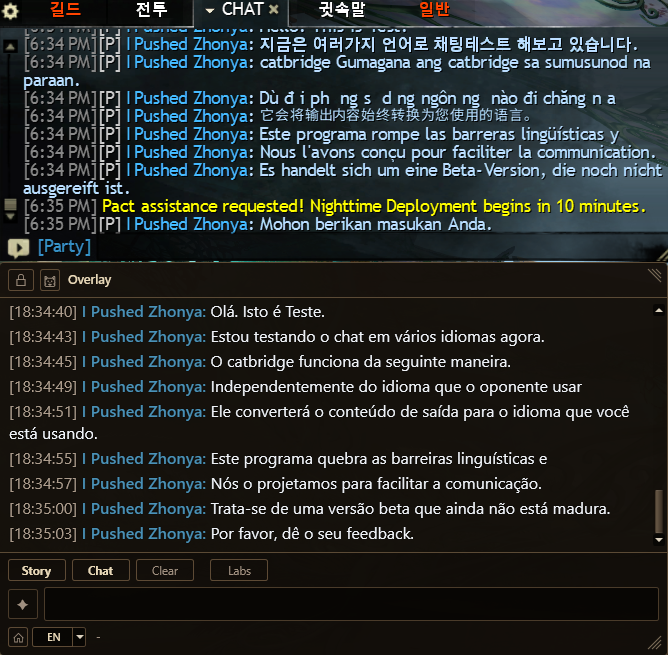
Portuguese
포르투갈어
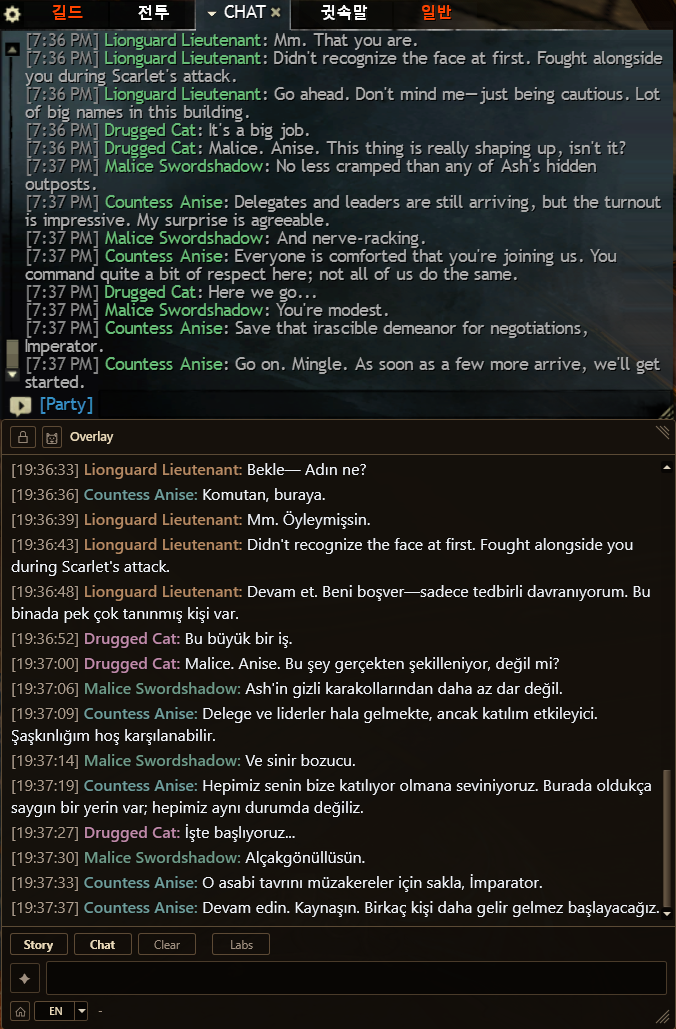
Turkish
터키어
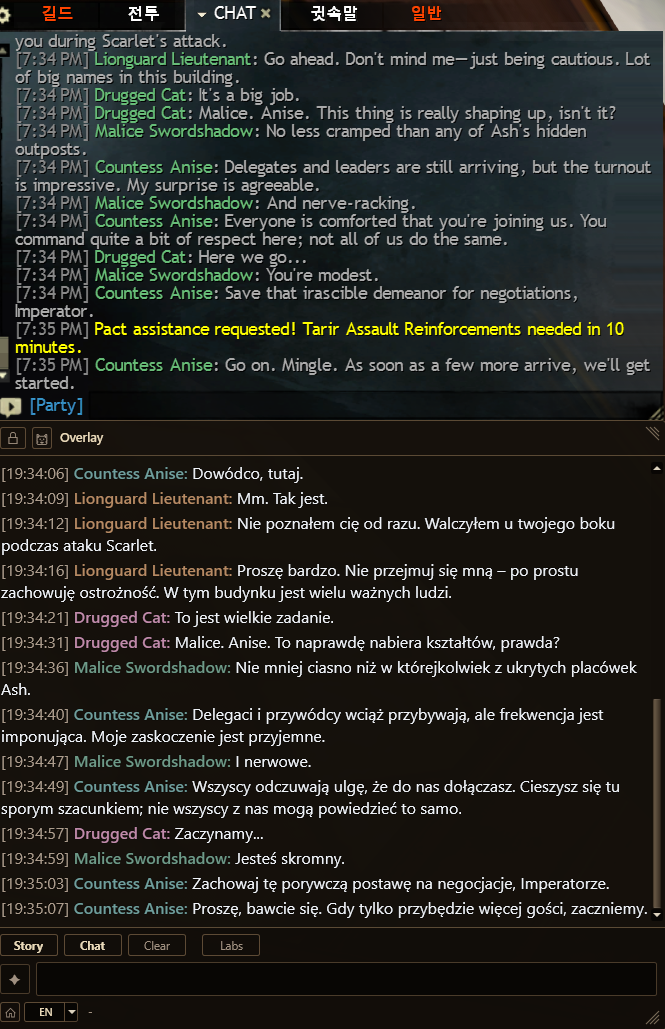
Polish
폴란드어
Examples shown above. CatBridge works with every language Google Translate and Gemini support — dozens in total, including English, French, German, Spanish, Russian, Arabic, Thai, and more.
위는 예시입니다. CatBridge는 구글 번역과 Gemini가 지원하는 모든 언어에서 동작합니다 — 영어, 프랑스어, 독일어, 스페인어, 러시아어, 아랍어, 태국어를 포함한 수십 개 언어.
Everything you need to play in your language
뭘 해주는 프로그램인가요?
From story quests to raid callouts, CatBridge keeps you in the loop.
스토리부터 레이드 콜까지, 언어 때문에 막히는 모든 순간을 해결합니다.
CatBridge is free
CatBridge는 무료입니다
CatBridge itself costs nothing. Download it, run it, and basic translation works immediately using Google Translate — no account, no signup, no payment.
CatBridge 자체는 완전 무료입니다. 다운로드해서 실행하면 구글 번역으로 바로 작동합니다. 회원가입도, 결제도 필요 없습니다.
What is the Gemini API?
Gemini API가 뭔가요?
Google's Gemini is an AI language model — the same technology behind Google's AI products. CatBridge can optionally connect to it for dramatically better translation. Instead of mechanical word-by-word translation, Gemini understands context: who's speaking, what the scene is about, and how each character would phrase things.
Gemini는 Google이 만든 AI 언어 모델입니다. CatBridge에 연결하면 번역 품질이 완전히 달라집니다. 단어를 하나하나 바꾸는 기계번역이 아니라, 누가 말하는지, 어떤 장면인지를 이해하고 자연스러운 문장으로 번역합니다.
Why would I pay Google?
왜 Google에 돈을 내야 하나요?
You're not paying CatBridge — you're paying Google directly for using their AI. CatBridge just connects to it on your behalf. It's like how a weather app is free, but the data comes from a paid weather service.
CatBridge 개발자한테 돈을 내는 게 아닙니다. Google의 AI를 쓰는 만큼 Google에 직접 내는 겁니다. 날씨 앱은 무료인데 기상 데이터는 유료 서비스에서 오는 것과 같습니다.
Pick what fits you
본인에게 맞는 방식으로
CatBridge gives you three options. Free Google Translate is enough to follow the story and chat in any content — don't feel pressured to pay. Move up only if you want more.
CatBridge는 세 가지 선택지를 줍니다. 무료 구글 번역만으로도 스토리나 채팅 흐름을 따라가는 데는 충분합니다. 돈을 꼭 쓸 필요 없습니다. 더 좋은 품질이나 추가 기능을 원할 때만 올라가면 됩니다.
Works out of the box. Basic machine translation — enough to understand NPCs, story, and party chat in any content.
Activates CatBridge's built-in persona dictionary for 273 characters, giving each NPC a unique voice. Also unlocks Nyarchive chatbot and Nyavis Discord summaries.
Higher-quality model for the best translation. Check the premium box in settings when you want top quality and don't mind paying more.
설치하면 바로 작동합니다. 기본 기계번역이지만 NPC 대사나 스토리, 파티 채팅을 이해하는 데는 무리가 없습니다.
CatBridge에 탑재된 273명 캐릭터 페르소나 사전이 활성화돼서 NPC마다 고유한 말투로 번역됩니다. 냥카이브 챗봇과 냥비스 디스코드 요약도 여기서부터 사용 가능합니다.
더 고성능 모델을 쓰는 최고 품질의 번역. 설정에서 프리미엄을 체크하면 활성화됩니다. 품질은 올라가고 비용도 같이 올라갑니다.
Cost is pay-per-use and scales with your own habits. Light players who only translate NPC dialogue and occasional party chat can come in under $2/month, sometimes much less. A player who runs Nyavis heavily (Discord voice summaries call the API much more than translation), keeps Premium checked, and plays many hours daily can easily spend several times more. There's no subscription — you pay Google for exactly what you use. Set a monthly spending cap in Google AI Studio, start low, and raise it only after a few sessions tell you what your real usage looks like.
비용은 쓴 만큼만 나오는 구조라서, 본인 습관에 따라 편차가 큽니다. NPC 대사와 가끔 파티 채팅 정도만 번역하는 라이트 유저는 월 2~3천 원 이하, 심지어 그보다 훨씬 적게 나올 수도 있습니다. 반대로 냥비스(디스코드 음성 요약)를 자주 돌리고, 프리미엄까지 켜고, 매일 오래 하는 헤비 유저는 몇 배 더 나올 수 있습니다. 구독이 아니라 사용량에 비례해 Google에 직접 내는 구조입니다. Google AI Studio에서 월 한도를 낮게 걸어두고 시작한 뒤, 몇 세션 써보고 실제 사용량을 확인하면서 조절하세요.
How it works
작동 구조
CatBridge is a standalone app that receives game data through ArcDPS.
ArcDPS가 게임 데이터를 잡아서 CatBridge로 넘기는 구조입니다.
- ArcDPS hooks into the game client to collect data
- Unofficial Extras extracts additional info (squad, chat, etc.)
- arcdps_catbridge.dll bridges that data to CatBridge via Named Pipe
- CatBridge handles translation, overlay rendering, and AI features
- ArcDPS가 게임 데이터를 수집
- Unofficial Extras가 스쿼드, 채팅 같은 추가 정보를 뽑아냄
- arcdps_catbridge.dll이 Named Pipe로 CatBridge에 전달
- CatBridge가 번역, 오버레이, AI 기능 전부 처리
ArcDPS, Unofficial Extras, and arcdps_catbridge.dll must all live in the same directory. If you use an addon manager like Nexus, ArcDPS may be in a subfolder — make sure the bridge DLL is placed alongside the actual ArcDPS installation.
ArcDPS, Unofficial Extras, arcdps_catbridge.dll이 한 폴더에 있어야 작동합니다. Nexus 같은 애드온 매니저를 쓰면 ArcDPS가 서브 폴더에 깔릴 수 있으니, 브릿지 DLL도 ArcDPS가 실제로 있는 곳에 넣어야 합니다.